Account and billing
Sign in, upgrade, change or cancel your plan, download your data and delete your account.
Your account holds your links, albums and sites, and your plan decides how much you can store. This page covers signing in, the Account page, upgrading, changing or cancelling your plan, and what happens to your data.
Sign in#
Link in Seconds uses Google sign-in. Click Continue with Google on the login page (or Sign up with Google on the sign-up page) and pick your Google account. There is no separate password to remember. Your first sign-in creates your account on the Free plan, with no card needed.
People who open your links never need an account. Only you, the person publishing, signs in.
The Account page#
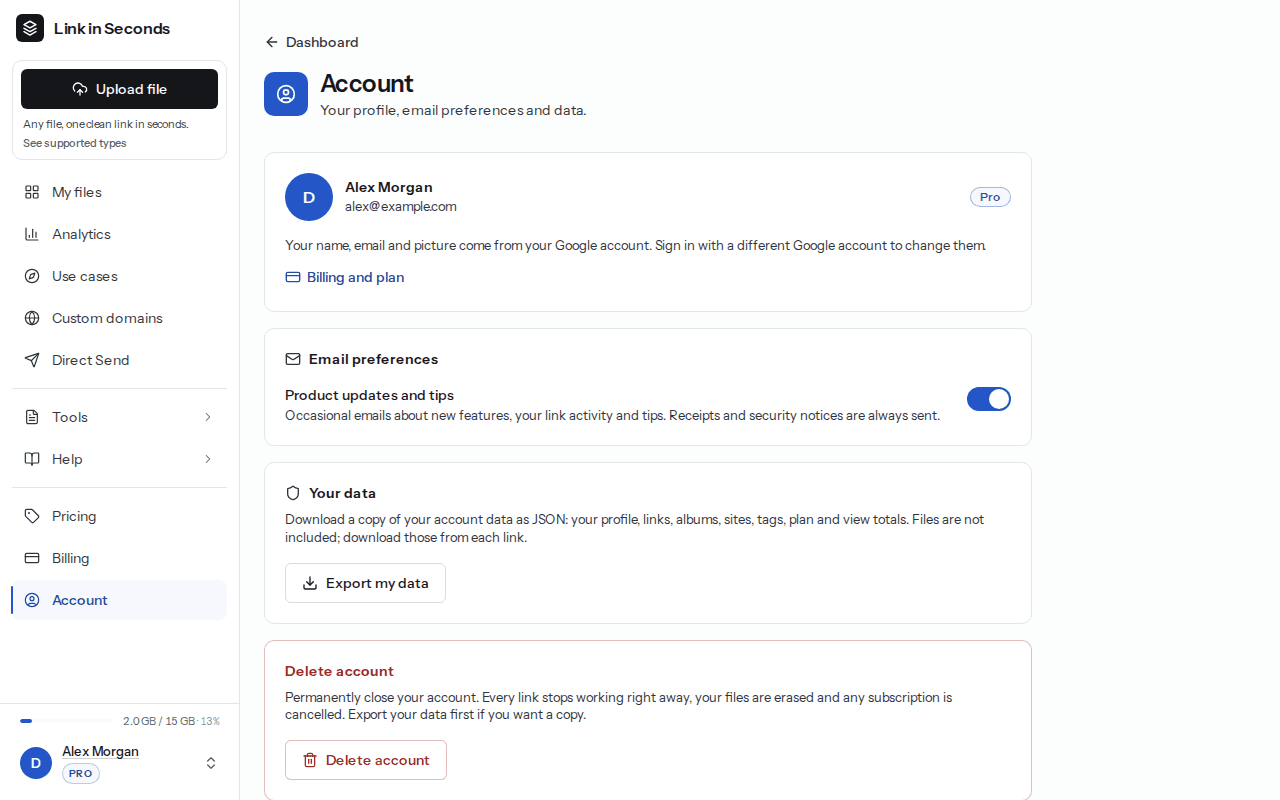
Open Dashboard → Account from the sidebar. It has four sections.
Profile
Your name, email and picture come from your Google account. To change them, sign in with a different Google account. Your current plan shows as a badge, and Billing and plan takes you to the Billing page.
Email preferences
The Product updates and tips switch controls occasional emails about new features, your link activity and tips. Turn it off to stop them. Receipts and security notices are always sent. Product emails also carry an unsubscribe link you can use instead.
Your data
Click Export my data to download a JSON file with your profile, links, albums, sites, tags, plan and view totals. Your files are not in the export: download those from each link.
Delete account
Click Delete account, type DELETE and click Delete everything. This happens right away and cannot be undone:
- All your links, albums and sites stop working immediately.
- Your files are erased from our storage.
- Any active subscription is cancelled and you are not charged again.
- A minimal record (a hash of your email and the deletion date) is kept for 180 days to prevent abuse, then removed.
Export first
Plans and prices#
There is one price list for everyone, in US dollars. Tax is added at checkout where it applies. Full details are on the Pricing page and in Plans and limits.
| Plan | Price | Links | Per file | Total storage |
|---|---|---|---|---|
| Free | $0 | 20 live links | 100 MB | 100 MB |
| Pro | $9/mo or $49/yr ($4.08/mo) | Unlimited | 200 MB | 15 GB |
| Lifetime | $99 once | Unlimited | 250 MB | 30 GB |
Upgrade#
Open Billing
Click Billing in the dashboard sidebar, or go to /dashboard/billing. You can also start from the Pricing page.
Choose a plan
On the Free plan you see Monthly · $9/mo, Yearly · $49/yr and Lifetime · $99 once. Each button shows its renewal terms underneath.
Pay at checkout
Checkout is run by Dodo Payments. When you come back, the Billing page may say Confirming your payment for a moment. Pro unlocks automatically when the payment clears.
Who charges your card
Manage your subscription#
Everything is on the Billing page, which shows your current plan and, for a subscription, when it renews.
- Invoices & payment method opens the Dodo Payments billing portal in a new tab, where you download invoices and change your card.
- Switch to yearly or Switch to monthly changes your billing period. Moving to yearly charges your card today, with unused time on your current plan counted as credit. Moving to monthly starts when your yearly period ends, and nothing is charged today.
- If a renewal fails, you see Payment needs attention. Pro stays active until the date shown. Update your card under Invoices & payment method to keep it.
- Subscribers can move to Lifetime with Upgrade to Lifetime. Your subscription then stops renewing on its own.
Cancel#
Open Billing to cancel
Go to /dashboard/billing and click Cancel subscription.
Confirm
Telling us why is optional. Click Confirm cancellation. There is no email or phone call needed.
What happens next:
- You keep Pro until the end of the period you paid for, and you are not charged again.
- Then your account moves to Free. Every link you already published keeps working, and we do not delete files because your account is over the Free limits.
- Pro-only settings, such as password, expiry date, custom link name and custom branding, stop applying. New uploads follow the Free limits.
- Changed your mind before the period ends? Click Resume plan on the Billing page.
Lifetime is a single payment with no renewal, so there is nothing to cancel.
Refunds#
Monthly, yearly and Lifetime plans are not refundable, including for unused time, except where the law requires a refund. Cancelling stops future renewals but does not refund the current period. Yearly subscribers get a reminder email about 30 days before each renewal, and any price change is announced by email at least 30 days before it applies. The full rules, including EU and UK withdrawal rights, are in the Refund & Cancellation Policy.
API keys#
To upload from your own code or an AI assistant, create an API key at Dashboard → API keys. Anything you publish with a key counts toward your plan, just like an upload on the website. See Authentication and API keys.
Related#
Last updated 4 October 2026. Something unclear or missing? Tell us.