How to track a shared file: who opened it, for how long, and on what device
Track who opened your file
You sent a file. Was it opened? By how many people? Did they read it, or glance and close it? Were they on a phone on the train or at a desk? An email attachment can't answer any of that. A tracked link can answer all of it, and without the creepy parts: no cookies, no stored IP addresses, no names unless the reader gives you one.
Here is what you can actually find out about a shared file, how each number is measured, and the honest limits.
The short version
- Upload the file and get a link.
- Send the link instead of attaching the file.
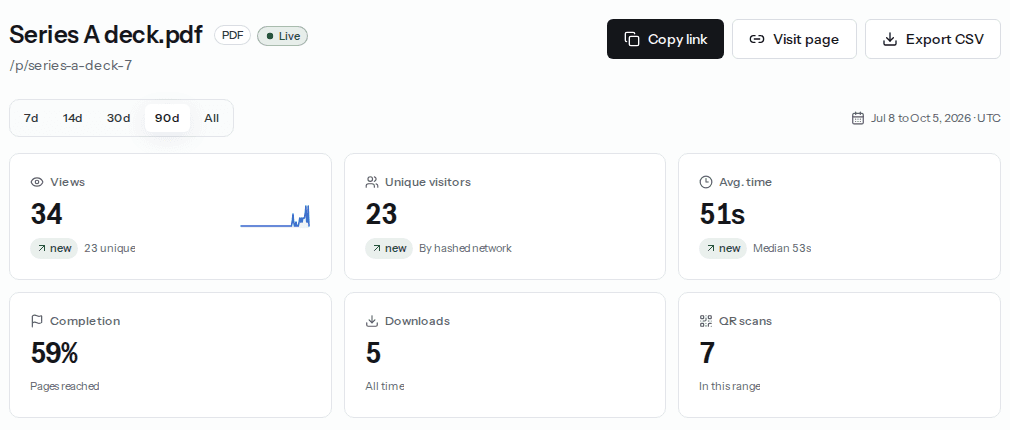
- Open the link's analytics to see opens, time spent, how far people got, device and location.
The rest of this post is what those numbers mean, so you can trust them.
What you can see about each open
| Question | What the report shows | How it is measured |
|---|---|---|
| Was it opened? | Views, and the time of every open | Each page load of the link, minus bots and link previews |
| By how many people? | Unique visitors | A one-way hash of the network address; the address itself is never stored |
| For how long? | Average and median time, plus time per visit | Seconds the tab was visible and in focus |
| How far did they get? | Pages reached, percent watched or percent scrolled | Reported by the viewer as they read |
| On what device? | Desktop, mobile or tablet, plus browser, OS and screen size | Read from the browser's user agent and window size |
| From where? | Country and city | A coarse location from the request, not a stored address |
| How did they arrive? | Direct, QR scan, album, embed or another website | The QR marker, the album page or the referrer |
| Did they come back? | Returning visitors, and visits per person | The same hashed network opening the link again |
| Did they keep a copy? | Downloads | Counted when the file is saved |
Time spent, measured properly
“Time on page” is where most tracking tools quietly lie. If someone opens your file, switches to another tab and comes back an hour later, a naive tracker reports an hour of reading. Here the clock only runs while the tab is visible and the window is in focus. It pauses when the tab is hidden or the device locks, and it stops when the visitor leaves.
You get the average, the median (which one very long visit can't drag up) and the share of quick bounces, opens that lasted under five seconds.
One visit at a time
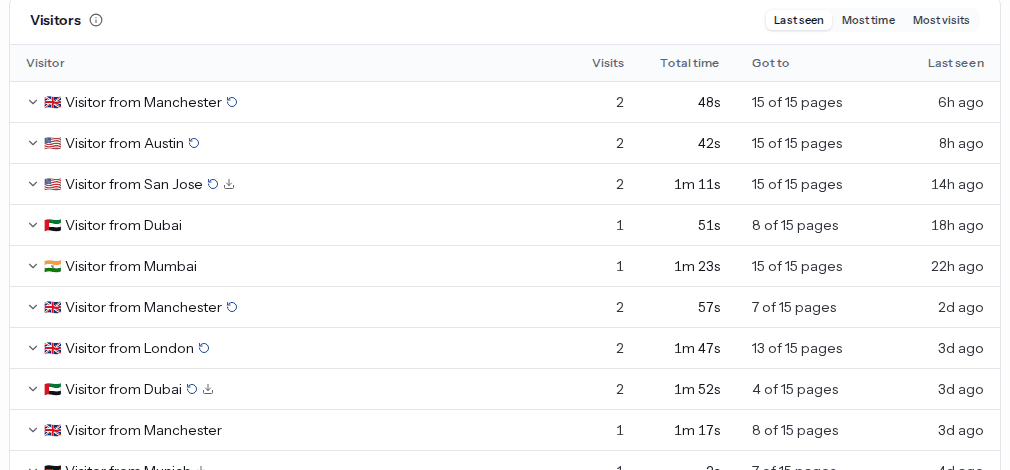
The Recent views table lists the latest opens: when, the city and country, device and browser, where they came from, how long they stayed and how far they got, such as “6 of 15 pages”. Expand any row to see that single visit page by page.
The Visitors card groups visits from the same network, so “Visitor from Manchester, 2 visits, 15 of 15 pages” tells you someone came back and finished it. That is usually the person to follow up with first.
Want to know who, by name?
Analytics never shows names or email addresses on its own. If you need to know exactly who opened a file, turn on “Ask for the viewer's email” in Link settings. Readers type an email before the file shows, and you get a Viewers table you can export. Readers see the request up front, which is the honest way to do it.
Get told the moment it is opened
Checking a dashboard is fine. Being told is better. Turn on “Email me when viewed” and you get an email when someone opens the link, at most once an hour per link so a busy link doesn't flood your inbox. The best time to reply to a proposal is right after it has been read.
The honest limits
- Shared networks blur people together. Two colleagues on the same office Wi-Fi can count as one unique visitor. One person who opens the link at home and then on mobile data can count as two.
- Messaging apps often hide the source. Many chat and email apps send no referrer, so those opens show as Direct.
- Scanners and previews exist. Email security scanners and chat link previews can open a link before a person does. Known bots are removed, and the brief opens a scanner leaves are flagged as atypical and kept out of every average. We wrote a whole post on why view counts look too high.
- Time needs JavaScript. A visitor with JavaScript off still counts as a view, but not time or progress.
Which files this works for
Any file you share as a link. PDFs get page-by-page reading (see which page readers stop on), videos and audio get watch-through, and images, web pages and text files get scroll depth. For PDFs specifically, our guide to knowing if someone opened your PDF compares the other methods too. Ready to try it? Send a tracked link.
Quick answers
Can I see the name of the person who opened my file?
Not by default. Analytics shows when, how long, how far, the device and a coarse location, but never a name. To know exactly who opened it, turn on Ask for the viewer's email in Link settings, and readers enter an email before the file shows.
Is file tracking free?
Views, unique visitors and the views-over-time chart are free on every link. Time spent, completion, devices, location, sources, per-visit details, the Visitors card, view alerts and CSV export are part of Pro.
Does the reader know the file is tracked?
The link opens like any web page. The tracker sets no cookies and stores no IP addresses, and what it collects is listed in the privacy policy. If you turn on the email gate, readers see that request before the file opens.
Can I export the tracking data?
Yes. On Pro, Export CSV downloads one row per open with time, location, device, source, time spent and progress, up to 10,000 rows. The same report is available as JSON from the analytics API and to AI assistants through the MCP server.
Turn any file into a link in seconds
Upload a PDF, image, video, or ZIP and get a clean, trackable link with a QR code, free.
Try Link in Seconds →