
Send Anywhere alternative

Share files with a link that lasts longer than 48 hours and opens in any browser.

Datei hier ablegen

Leg gleich mehrere ab, daraus wird ein Album-Link

oder Bild einfügen Ctrl+V

Free up to 5 MB, no card. Bigger files: 7 days free, then from 3 $/mo. Cancel anytime. See plans

Kostenlos testen
Genutzt von über 5.500 Menschen in 140 Ländern
“Meine Schüler fanden es alle einfach zu bedienen, und alles lief einwandfrei.”
Jason, Lehrer · teilt Unterrichtsmaterial
Kein Konto zum AnsehenLäuft im Browser, nichts zu installieren
BilderPDFsVideoAudioFolienCodeWebsites

What is a good Send Anywhere alternative?

For links that must last more than 48 hours, Link in Seconds is a good Send Anywhere alternative. You upload a file and get a link with no expiry date unless you set one. It opens in any browser with no app, and you see when it was opened. For a quick device-to-device send, our free Direct Send works like Send Anywhere's 6-digit key.

Menschen teilen Dateien
5.500+
geteilte Links
11.400+
Mal geöffnet
39.900+

How to share a file without Send Anywhere

  1. Upload the file

    Drop the file into the box above, or pick several files to make one album link.

  2. Choose who can open it

    Add a password, an end date or a view limit, or turn off downloads.

  3. Send the link

    Paste it into any chat or email. It keeps working after 48 hours.

So sieht es aus

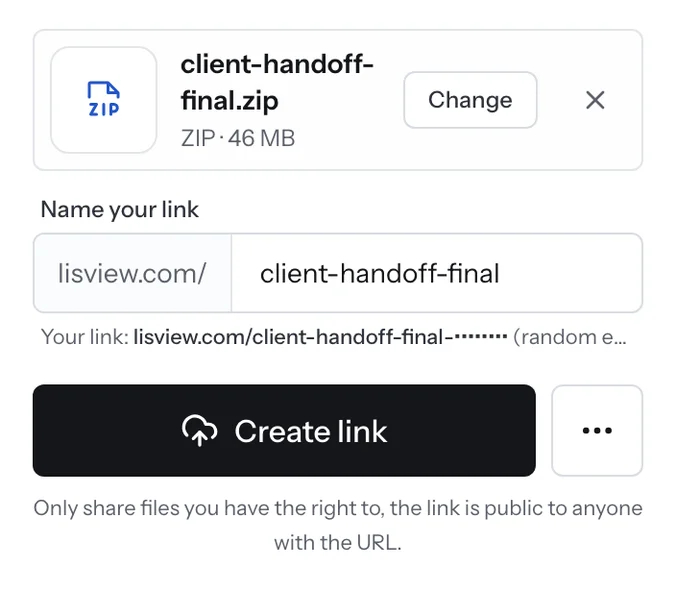
Das Upload-Feld mit ausgewählter client-handoff-final.zip (ZIP, 46 MB) und dem Linknamen lisview.com/client-handoff-final, bereit zum Erstellen
Datei auswählen und den Link benennen.
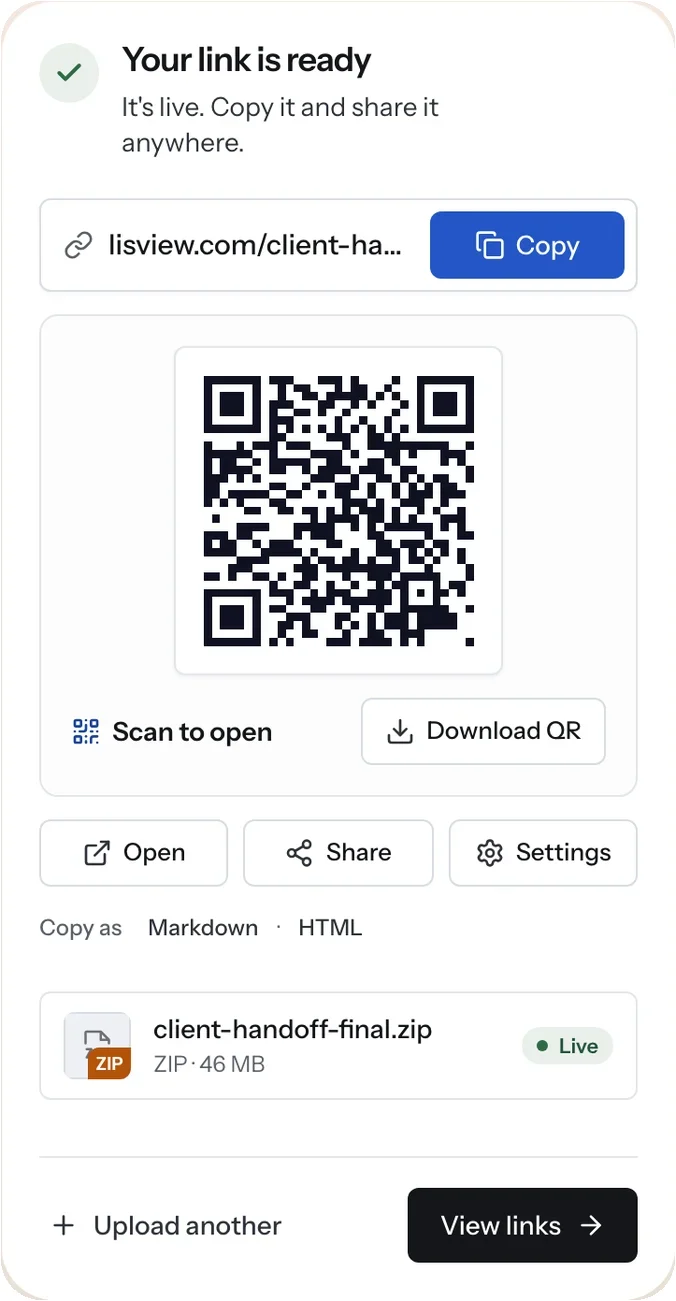
Dein Link ist fertig: ein lisview.com-Link für client-handoff-final.zip (46 MB) mit Kopieren-Button, QR-Code und Live-Badge
Link oder QR-Code kopieren.
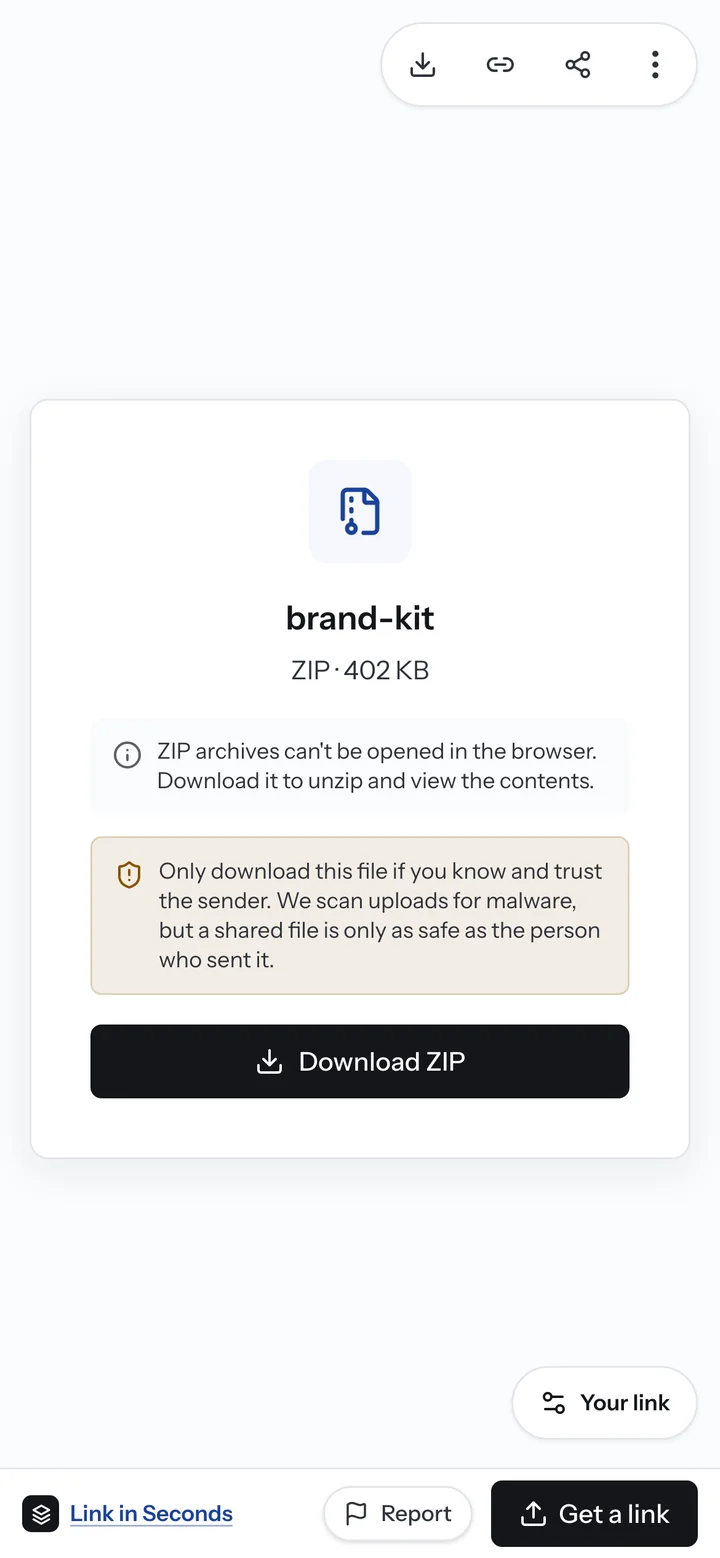
Die Download-Seite auf dem Handy: Archivname, Größe und ein Button ZIP herunterladen, ohne Anmeldung
Geöffnet auf jedem Gerät, ohne Konto.

Why use a link instead of Send Anywhere?

It lasts longer than 48 hours

Free Send Anywhere links last 48 hours. A link here has no end date unless you add one, so it still works when a client opens their email next week.

It opens in the browser, no app

Videos play, PDFs show page by page, and Word and Excel files open as pages. The person you send to doesn't install an app or download first.

You see when it was opened

Every open shows the day, device and country. Turn on email alerts to hear about the first open.

Device to device is still free

Need to move a file between your own phone and laptop right now? Direct Send sends it browser to browser, with nothing stored and no size limit.

Try Direct Send

Link in Seconds and Send Anywhere compared

Link in Seconds

Made for
Links that stay live
Device-to-device send
Direct Send, free, no size limit
How long a link lasts
No end date unless you set one
Largest upload
10 GB per file
Opens in the browser
Video, PDF, images, Word, Excel
See when it was opened
Ja
Replace the file, same link
Ja
Price
From 3 $/mo after the 7-day trial

Send Anywhere

Made for
Quick sends between devices
Device-to-device send
6-digit key
How long a link lasts
48 hours free; no expiry on Plus
Largest upload
Up to 50 GB on Plus
Opens in the browser
Web, apps and download
See when it was opened
Not listed
Replace the file, same link
Nein
Price
Free app; Plus on send-anywhere.com
Send Anywhere facts are from its App Store listing and the developer's replies there, checked November 2026. Send Anywhere's Plus price is not listed in the store, so check send-anywhere.com. Send Anywhere is the better pick when you want one app on every device and quick sends with a short key.

Frag ChatGPT, Perplexity oder Claude, wie Link in Seconds im Vergleich zu Send Anywhere abschneidet.

Which one should you use?

Link in Seconds

You upload once and get a short link that stays live until you turn it off. It opens in any browser, shows each open, and you can swap the file later without changing the link. Direct Send covers quick device-to-device sends for free.

One uploaded file can be up to 10 GB, and you sign in to upload. There is no phone app; it works in the browser. From $3/mo after the 7-day trial.

Am besten für: files you send to clients, students or family that need to keep working for weeks.

Stark bei

  • No 48-hour countdown
  • Videos and documents open in the browser
  • See when and where it was opened
  • Free Direct Send between devices

Schwächer bei

  • No native phone app
  • 10 GB per uploaded file
  • Account needed to upload

Gut zu wissen

  • Uploads are scanned for safety, so they are not end-to-end encrypted.
  • Direct Send needs both browsers open until the file arrives.

Send Anywhere

Send Anywhere has apps for phones, computers and the web. You can send a file to a nearby device by typing a 6-digit key, or create a link to share. Send Anywhere Plus adds links that don't expire and uploads up to 50 GB.

On the free app, links are valid for 48 hours, so they often expire before people open them. Its store listing mentions no way to see when a link was opened. Plus is a paid subscription; its price is on send-anywhere.com.

Am besten für: moving photos and videos between your own devices, or to someone right next to you.

Stark bei

  • Apps on every platform
  • Fast 6-digit key transfers
  • Plus: no-expiry links, 50 GB uploads

Schwächer bei

  • Free links last 48 hours
  • No open tracking listed
  • Plus price not shown in the store

Was Nutzer sagen

“Die Admin-Oberfläche ist unglaublich intuitiv und genau so aufgebaut, wie ein Nutzer denkt. Meine Schüler fanden es alle einfach zu bedienen, und alles lief einwandfrei.”
JasonLehrer, teilt Unterrichtsmaterial
“Die App ist wirklich schön und einfach zu bedienen. Ich habe alle meine App-Links an einem Ort, meine App-Store- und Play-Store-Screenshots, und ich organisiere meine Bilder und PDFs in Alben mit Tags. Dank des großen Speichers liegt alles hier.”
EvelynApp-Entwicklerin
“Ich verwalte Verträge, Rechnungen und juristische Dateien für mehrere verschiedene Organisationen, also ist fast alles, was ich sende, passwortgeschützt. Link in Seconds macht das einfach, und mein Portfolio läuft auf einer eigenen Domain. Es ist leicht zu bedienen und wirklich erschwinglich.”
Guy HenryFreelancer, Verträge und Rechnungen

Jede Link-Funktion in jedem Tarif

Die Tarife unterscheiden sich im Umfang: Links, Speicher und Dateigröße, dazu HTML-Seiten und Website-Hosting.

Pro monatlich

9 $/Monat

monatlich abgerechnet, jederzeit kündbar

  • Unbegrenzte Links
  • 100 GB Speicher
  • 10 GB pro Datei
  • Jede Link-Funktion inklusive
  • HTML-Seiten und Website-Hosting
Tarifdetails ansehen

Lifetime

149 $99 $einmalig

eine Zahlung, keine Verlängerung

  • Unbegrenzte Links
  • 200 GB Speicher
  • 10 GB pro Datei
  • Jede Link-Funktion inklusive
  • HTML-Seiten und Website-Hosting
Tarifdetails ansehen
Bestes Preis-Leistungs-Verhältnis

Pro jährlich

4,08 $/Monat

49 $ pro Jahr abgerechnet

  • 55 % günstiger als monatlich
  • Unbegrenzte Links
  • 100 GB Speicher
  • 10 GB pro Datei
  • Jede Link-Funktion inklusive
Tarifdetails ansehen

7 Tage kostenlos, danach 9 $/Monat zzgl. Steuern. Heute 0 $, jederzeit kündbar.Oder teile Dateien bis 5 MB gratis, ohne Kreditkarte.

Alle Tarife vergleichen

Kommst du von WeTransfer, DocSend oder tiiny.host? Zu den Vergleichen

Questions about switching from Send Anywhere

For links people open later, a file link with no expiry date, like Link in Seconds. For quick sends between your own devices, Send Anywhere's apps or our free Direct Send.

Die Details

What are the limits?

  • Links here take files up to 10 GB each. Files up to 5 MB are free with no card. Small takes files up to 3 GB (3 $/month) and Pro up to 10 GB (9 $/month), both after a 7-day free trial.
  • Links have no expiry date unless you set one. If a plan ends and your files are over the free 5 MB, links pause until you subscribe or delete files; nothing is deleted.
  • Direct Send only works while both browsers are open, because nothing is stored on a server.

When should I keep using Send Anywhere?

Keep Send Anywhere if you mostly move files between your own devices with its apps, or to someone sitting next to you. Use a link here when the other person will open the file later, needs it to play or open in the browser, or when you want to know it was opened.

  • Verdict: Send Anywhere for quick sends between devices, a link here for files that must last.
  • Best for Send Anywhere: phone-to-laptop photo moves and nearby sends.
  • Best for a link here: client deliveries, course files and anything you update.

How long does a Send Anywhere link last?

48 hours on the free app, according to its App Store listing (checked November 2026). Send Anywhere Plus can create links with no expiry date. A link here has no end date on any plan unless you set one.

Is there a 6-digit key option here?

Direct Send is the closest match. You pick a file and get a link or QR code to open on the other device. The file goes browser to browser over an encrypted connection, nothing is stored, and there is no size limit. It is free.

Open Direct Send

Can I protect a shared link?

Yes. Add a password, an end date or a view limit, or turn off downloads so people can only view the file. All of these work on every plan, and you can turn the link off at any time.

Password-protected file sharing

Who uses a link instead of Send Anywhere?

  • Photographers. Send a shoot as one album link that clients can still open after the weekend.
  • Agencies. Share videos and decks that play in the browser, and see when the client opened them.
  • Designers. Hand over files as one ZIP link and update it after each round.
  • Teachers. Post class files that open on any phone or laptop, with no app to install.

Was ein Link alles kann

  • Eigener Link-Name: Ein Link, den man sich merkt. Benenne den Link selbst statt eines Zufallscodes. lisview.com/dein-name liest sich sauber in einer Mail, auf einer Folie oder unter einem QR-Code. Reservierte Wörter sind gesperrt, der Link funktioniert immer. Name behalten, Datei dahinter später tauschen.
  • Passwortschutz: Nur für die richtigen Leute. Vergib ein Passwort und die Datei bleibt versiegelt, bis jemand es eingibt. Du kannst den Link überallhin weiterleiten, er öffnet sich trotzdem nur für Leute mit dem Passwort. Gehasht, nie im Klartext gespeichert. Greift bei der Datei selbst, nicht nur auf der Seite.
  • Ablauf & Aufruflimit: Links, die sich selbst schließen. Lege ein Enddatum oder ein Aufruflimit fest, und der Link schaltet sich von selbst ab. Schick ein Angebot, das Freitag abläuft, oder eine Vorschau, die nach fünf Aufrufen schließt. Nach Datum, nach N Aufrufen oder beides. Jederzeit wieder öffnen, indem du das Limit ausschaltest.
  • QR-Code: Ein druckfertiger Code für jeden Link. Jeder Link bekommt einen scharfen QR-Code, in jedem Tarif enthalten. Druck ihn auf Speisekarte, Flyer, Wandschild oder Verpackung: Er öffnet denselben Link wie ein Klick. Als SVG oder PNG in jeder Größe herunterladen. Datei später tauschen, der gedruckte Code funktioniert weiter.
  • Aufruf-Tracking: Sieh, wann er geöffnet wird. Sieh, wie viele Leute den Link geöffnet haben und wann, mit allen Details: Verweisquellen, Geräte, Länder und QR- oder Direktaufrufe. In jedem Tarif enthalten. Ein Live-Zähler an jedem Link, ohne Einrichtung. E-Mail beim ersten Öffnen.

Share a link that lasts

Upload the file, copy the link and send it anywhere.

Free up to 5 MB, no card. Bigger files: 7 days free, then from 3 $/mo. Cancel anytime. See plans

Optionale Cookies für Analyse, Werbung und Session-Replay.