Turn a PDF brochure or catalog into a shareable link with a QR code
Your catalog as a link and QR
Your brochure or product catalog already exists as a PDF. The problem is getting it in front of people. Emailing a 40 MB catalog bounces. Printing 500 copies means they are out of date the day prices change. Flipbook services want a monthly fee and put their branding around your pages.
The simple version: turn the PDF into one link, print that link as a QR code, and update the file whenever you need to without reprinting anything. Here is how to do it, plus how to see which pages people actually look at.
Why a link beats a printed or attached brochure
| Printed copies | Email attachment | Link + QR code | |
|---|---|---|---|
| Reaches people at an event or in a shop | Yes | No | Yes, by scanning |
| Size limit | None | About 20 to 25 MB | Up to 100 MB free |
| Update prices or stock | Reprint | Send again | Replace the file, same link |
| Opens on a phone | Not applicable | Needs a PDF app | In the browser |
| Know if it was read | No | No | Yes |
Make it in five minutes
- Export the brochure or catalog as one PDF. From InDesign, Canva, Word or Google Docs. If it is huge, our guide to reducing PDF size helps, but a link handles large files fine.
- Upload it. You get a link that opens the PDF in a page-by-page viewer in any browser, on any phone, with no app and no sign-up for the reader.
- Give it a clear name. On Pro you can set a custom link such as /p/autumn-catalog. Do this before you print: changing the name later changes the address, and printed codes would stop working.
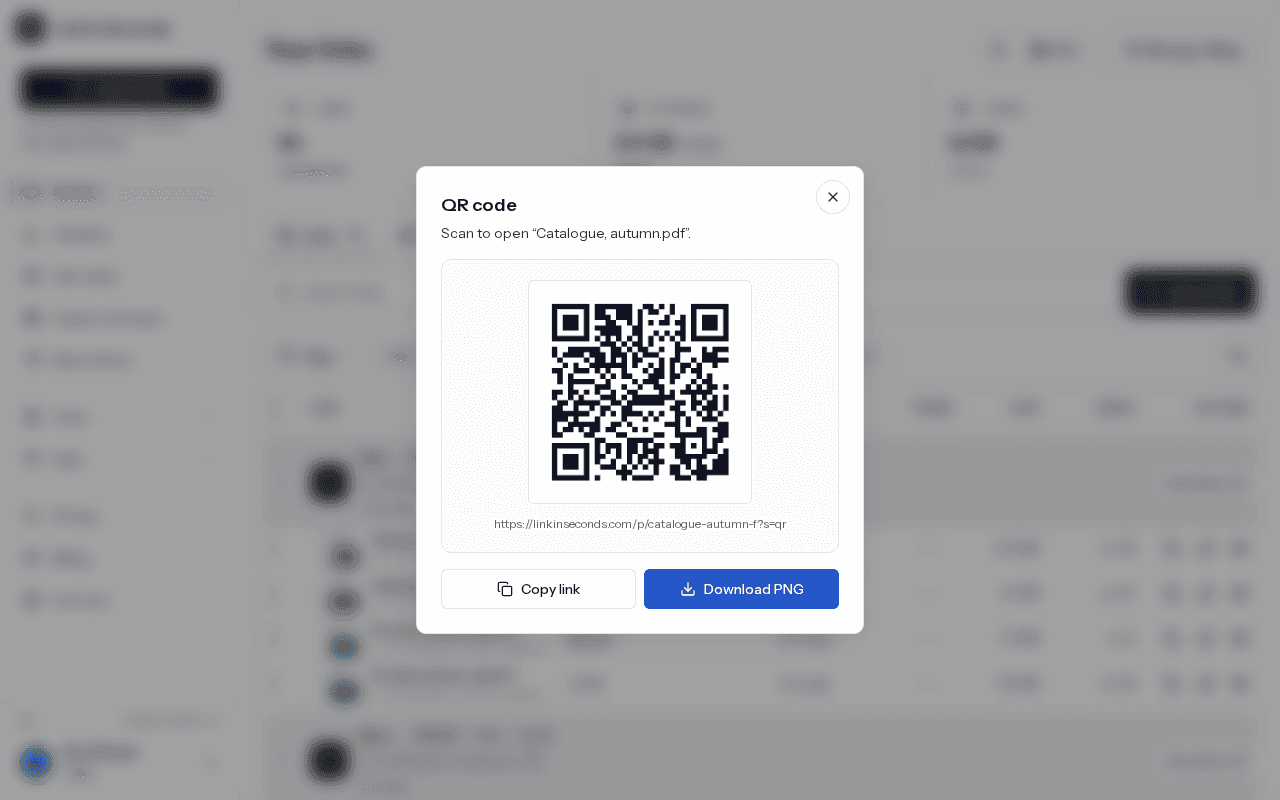
- Download the QR code. Every link has one, free on every plan. It is a 512 by 512 pixel PNG, ready for print.
- Put the QR and the link everywhere. Counter cards, trade show stands, packaging, invoices, the back of a business card, your email signature.
Printing tips that save a reprint
- Scan the code with your own phone before you print a batch.
- Keep the white border around the code, print dark on light, and don't stretch it out of square.
- Add a few words next to it, like “Scan for the full catalog”, so people know what they get.
- Make it big enough to scan from where people stand. A poster needs a larger code than a card.
Update it without reprinting
This is the real advantage. The QR code points at your link, not at the file. When prices change or a product sells out, replace the file and the same printed code opens the new version. The link, the code and the view history all stay. Replacing a file is free on every plan, and on Pro, version history keeps the earlier files so you can restore one.
See what people actually read
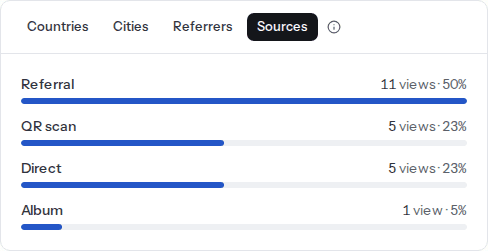
Every scan is tagged. The address inside the code carries a small marker, so on Pro your analytics show QR scans separately from people who clicked the link in an email or on your website. That tells you whether the trade show stand or the newsletter did more work.
For a catalog, page-by-page reading (also Pro) is the useful part. It shows how far people browse and which pages hold them longest, which is a decent proxy for which products interest them. If most readers stop after page 6, put your best sellers before page 6. More on reading that chart in see which page readers stop on.
Make it look like yours
- View-only: turn off downloads if you'd rather people browse online. Free on every plan.
- Embed on your website: copy a ready-made iframe snippet and show the catalog inside your own page. Free. See how to embed a PDF.
- Custom branding (Pro): your logo and accent color on the public page instead of ours.
- Custom domain (Pro): open the catalog on an address like catalog.yourshop.com.
- Several catalogs, one code: put them in an album and print the album's QR. One scan opens the whole set.
Quick answers
Will the printed QR code still work if I update the brochure?
Yes. The code points at your link, not at the file. Replace the file and the same printed code opens the new version, with the view count carried over. The only thing that breaks a printed code is changing the link's name afterwards.
Is the QR code free?
Yes, every link has one on every plan. It downloads as a 512 by 512 pixel PNG with a white border, ready for print.
Can I see how many people scanned the QR code?
Yes. The address inside the code carries a small marker, so scans are counted apart from clicks. On Pro, QR scans appear as their own tile and as a traffic source next to direct and referral opens.
How big can the PDF be?
Up to 100 MB on the Free plan and 200 MB on Pro. A catalog full of photos is usually far smaller once exported for screens, and the link opens it page by page in the browser either way.
Turn any file into a link in seconds
Upload a PDF, image, video, or ZIP and get a clean, trackable link with a QR code, free.
Try Link in Seconds →