Share a website you built with AI as a live link
Share an AI-built website as a link
You prompted an AI tool (ChatGPT, Claude, v0, Lovable, Bolt) and it generated a working website. You exported or downloaded the output and now you have a ZIP file, a dist/ folder, or a handful of HTML, CSS and JS files sitting on your desktop. The AI gave you the code. It did not give you a live URL.
That gap (“I have files but no one can see it”) is where most people get stuck. The standard answer is: pick a hosting provider, create an account, install a CLI, configure a deploy pipeline. That is real work, and it is overkill for a demo, a prototype, or a one-off page you just need to show someone. There is a faster path: drop the ZIP and get a live link in seconds.
Why the AI hands you files and not a URL
Every AI builder generates static output: HTML, CSS, JavaScript, maybe some images. Static means the files are complete as-is; there is no server to run, no database to provision. In principle, any browser can render them. In practice, a file on your hard drive is not on the internet. Someone has to serve those bytes over HTTPS from a publicly reachable address before anyone else can load the page.
That serving step is what a static host does. The AI tool's job ends at generation. Your job (the part that used to require a Netlify account and a CLI) is to get those files onto a host. Link in Seconds does that in one drag-and-drop.
The publish flow
Step 1: ZIP your output
If the AI tool gave you a folder, compress it: right-click on macOS and choose Compress, or run zip -r site.zip dist/ in a terminal. The ZIP should contain your index.html at the root (or inside one folder, the publisher handles both). If the AI already exported a ZIP, use it directly.
Step 2: Drop it in
Drag the ZIP onto the upload card. You sign in once with Google; the people you share the link with need no account at all. The ZIP is unpacked, the files are served from an isolated origin with a free SSL certificate, and you get a clean link, something like your-name.linkinseconds.site, within a few seconds.
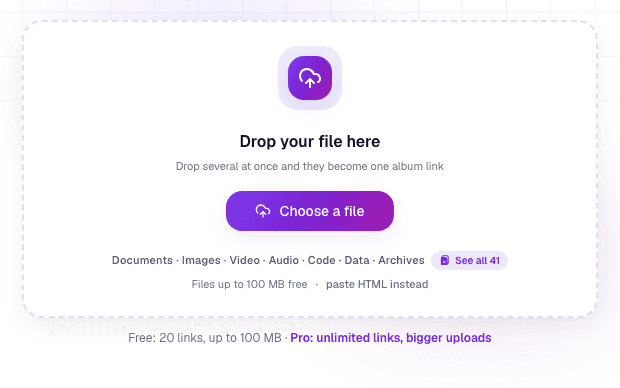
Step 3: Send the link
Copy the link and paste it wherever you need: a Slack message, an email, a client portal, a tweet. It behaves like any link you'd share files online with, except it opens a full website. Anyone who clicks it loads the site in their browser. Your JavaScript runs, your styles load, your pages navigate. No “download the ZIP first.” No “request access.” Just the live site.
What actually runs on that link
The published site runs exactly as-is: no server-side rendering, no compilation, no build step applied after upload. Whatever the AI generated is what loads. A few things worth knowing:
- Your JavaScript runs. Interactivity, animations, form handling, client-side routing. If the AI built it as a single-page app, it works. The site is served as static files but the browser executes everything in them.
- It runs on an isolated origin. The subdomain is sandboxed from linkinseconds.com; cookies, localStorage and scripts from one site cannot touch another. Standard browser security, same as Netlify or Vercel subdomains.
- No server-side logic. If the AI added a Node.js API route, a database call, or a server action, those parts will not run. They are server-side code and this is static hosting. Pure HTML + CSS + JS works fully; server-dependent features need a real backend host.
- Everything loads from the ZIP. For safety, a site can only load files from its own address. Scripts or fonts from a CDN, images hosted elsewhere and calls to outside APIs (Supabase, Firebase and the like) are blocked, so bundle libraries into your build. An app that logs users in or reads a database needs a host that allows outside calls.
- SSL is included. The link is HTTPS from day one. No certificate to provision or renew.
When to use this vs a full host
This is the right tool when speed matters more than permanence: a prototype you're showing a client tomorrow, a landing page you want feedback on before committing to a domain, a demo you built in an hour and need to share in the next five minutes. It is also the right tool for one-off deliverables: the HTML report, the interactive data visualisation, the AI-generated microsite that has one job and then lives quietly on a link forever. The same one-drop flow turns a single file into a link too, whether you need to turn a PDF into a link for that report or share an image as a link for a mockup.
When you're ready to go to production (custom domain, CI/CD pipeline, team deploys), move to Vercel, Netlify, or Cloudflare Pages. Those are excellent for long-running projects. For everything else, a ZIP-to-link in thirty seconds is usually the right call.
Try it now
If you have a ZIP from an AI builder and you want it live in the next minute, the full walkthrough is at how to publish an HTML ZIP as a link. Or if you want the broader picture of what static hosting via a link covers, see host a static website from a ZIP. That page has the format guide, limitations, and examples. Either way, the shortest path from “the AI gave me files” to “here's the link” is one drop.
Turn any file into a link in seconds
Upload a PDF, image, video, or ZIP and get a clean, trackable link with a QR code, free.
Try Link in Seconds →