Google Drive download quota exceeded? Why 'too many users' locks a file, and how to fix it
Too many users?
Drive quota · up to 24 h
You click a Google Drive link and instead of the file you get: "Sorry, you can't view or download this file at this time. Too many users have viewed or downloaded this file recently." Or the shorter version, "Download quota is exceeded for this file." Nothing is wrong with your browser or your account. The file has been opened too often in a short time, and Google has paused it for everyone.
Below: what the limit actually is, how long it lasts, what you can do as the person trying to download it, what you can do as the owner, and how to share a file that is popular enough to trip it without it happening again.
The short answer
- What it is
- A temporary per-file limit on views and downloads
- Who it blocks
- Everyone opening that file, owner included
- How long
- Up to 24 hours, per Google's own message
- Published limit
- None, Google doesn't say
- Owner fix
- Make a copy and share the copy's link
Why Google Drive limits downloads
Drive is storage first and sharing second. To stop a single public file from turning into a free content-delivery network for a game mod, a leaked movie or a dataset posted on a big forum, Google caps how much traffic one shared file can draw in a rolling window. Cross the line and the file is locked for a while, then it comes back on its own.
Three things are worth knowing about it:
- It is per file, not per viewer. You haven't done anything wrong. Thousands of other people opening the same link are what tripped it.
- Google publishes no number. Guides that quote an exact figure are guessing. In practice it shows up on files that are large, publicly shared and posted somewhere with a lot of traffic.
- Paying does not remove it. Google One buys storage, not sharing bandwidth. Work and school accounts hit it too.
The Drive errors that look alike
Not every "can't open this" screen is the quota. Match the wording first, because the fix is different for each:
| What the page says | What it means | What to do |
|---|---|---|
| Download quota is exceeded for this file, so you can't download it at this time | Too many downloads in a short window | Wait, or ask the owner for a copy |
| Sorry, you can't view or download this file at this time. Too many users have viewed or downloaded this file recently | Same limit, shown on the preview page | Wait up to 24 hours, or ask for a copy |
| You need access / Request access | The file is not shared publicly | Ask the owner to change General access |
| Sorry, the file you have requested does not exist | The file was deleted or the link is wrong | Ask the owner for a new link |
If you see a request-access screen instead, the file simply isn't shared publicly; we cover that one in why a Google Drive link asks for access.
If you are trying to download the file
- Wait. It is the only fix that always works. Google's own message says it can take up to 24 hours. Try again later in the day, then the next morning.
- Sign in to a Google account first. Several people report that opening the link while already signed in to Gmail in the same browser gets them through. It is anecdotal, but it costs nothing to try.
- Ask the owner for a fresh copy. The limit is attached to that one file. A copy is a new file with its own count, so the owner can share a working link in a minute (steps below).
- Skip the old "add to My Drive" trick. Older guides tell you to add the file to your own Drive and make a copy there. Drive now adds a shortcut rather than a copy, and the shortcut points at the same locked file, so most people find it no longer works.
If you own the file: how to fix it
- 1
Make a copy of the file in your own Drive
Open the file in Google Drive (you are the owner), choose File, Make a copy or right-click, Make a copy. The copy is a new file with its own ID, so it starts with a clean download count. - 2
Share the copy
Open Share on the copy, set General access to Anyone with the link, and copy the new link. The old link stays locked until Google lifts the limit. - 3
Replace the old link everywhere you posted it
Swap the new link into your email, forum post, course page or bio. This is the catch: any QR code or message that holds the old link still points at the locked file. - 4
Move the file somewhere without a download quota if it keeps happening
A copy only buys time. If the file is popular enough to trip the limit once, it will trip it again, so host it on a link that is built to be opened by many people.
How to share a popular file without hitting a limit
If a file gets opened often enough to lock on Drive, it needs a host that is meant to be opened by a lot of people. Link in Seconds gives the file its own clean link with no daily download quota and no bandwidth meter, on every plan, free included. A link that suddenly gets shared around keeps serving.
- It opens instead of downloading. PDFs page through in the browser, videos play with seeking and images show full size, so most visitors never download anything. There is no Drive preview screen and no sign-in prompt for the reader.
- You can see the traffic. Every link shows views, unique visitors, time spent, device and city, free. You find out the file is popular from a chart, not from an error page.
- You can update it without a new link. Replace the file behind the link and the URL and QR code stay the same, so you never have to chase down every place you posted it. More in update a PDF without changing the link.
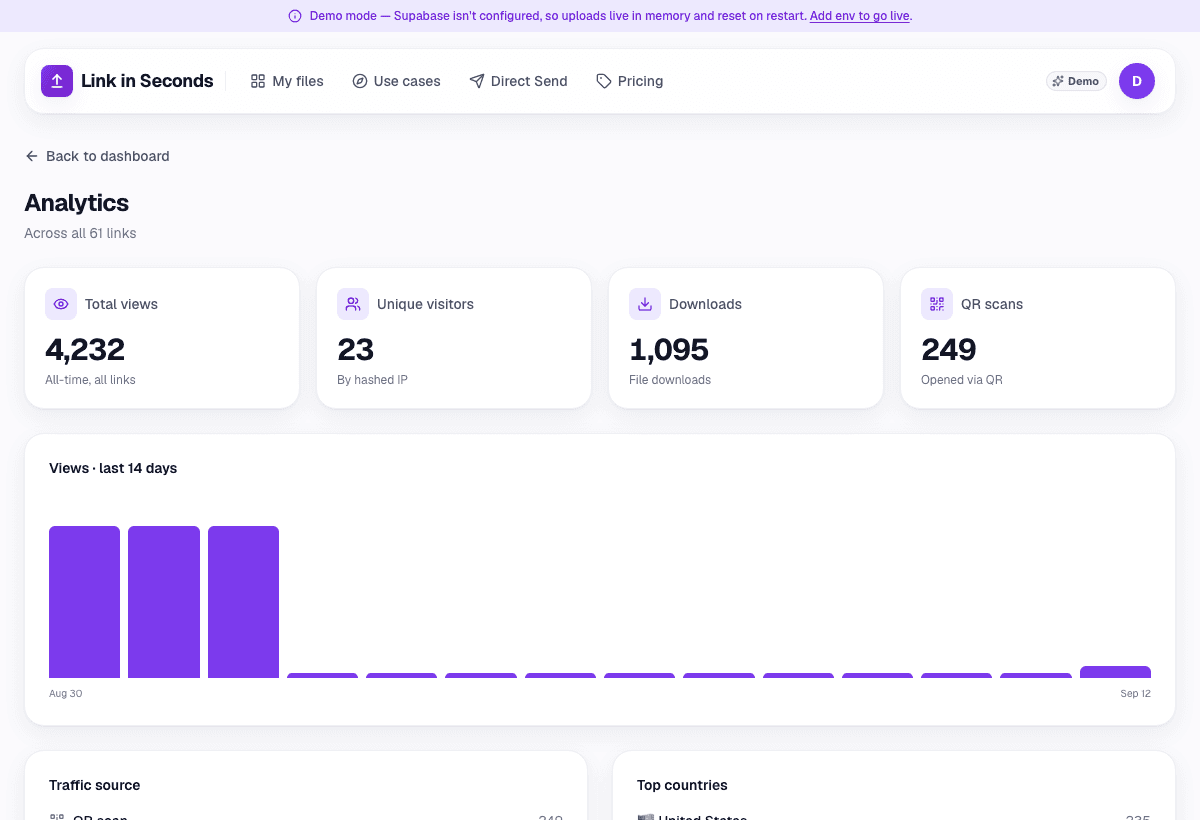
The honest limit is size: a free file can be up to 250 MB, and 500 MB on Pro. For a 20 GB dataset, Drive (or a transfer service) is still the right home, and the copy trick above is your best tool. For the PDFs, videos, slide decks and images that people actually pass around, a Google Drive alternative built for public links is the cleaner fix.
Google publishes no figure for this limit. The 24-hour wait and the administrator advice come from the wording of Drive's own error message; the workarounds are what people report, checked October 2026.
Quick answers
What does 'download quota exceeded' mean on Google Drive?
It means the file has been downloaded or viewed so many times in a short period that Google has temporarily stopped serving it. The limit is per file, not per person, so it hits everyone who opens that link, including you. Google does not publish the exact number.
How long does the Google Drive download limit last?
Google's own error text says it may take up to 24 hours before the file can be viewed or downloaded again. If a file is still blocked after that, Google suggests contacting your domain administrator, which applies to work and school accounts.
How do I bypass the Google Drive download quota?
As a recipient, waiting is the only reliable option; signing in to a Google account before opening the link helps some people, and the old trick of adding the file to your own Drive and copying it is unreliable now. As the owner, make a copy of the file and share the copy's link, because the copy is a new file with a fresh count.
Does paying for Google One remove the download limit?
No. Google One adds storage, not sharing bandwidth, and the limit applies to how often a single shared file is downloaded. Google Workspace accounts can hit it too.
Is there a way to share a popular file without a download limit?
Yes, host it somewhere that serves files without a per-file quota. A Link in Seconds link has no daily download cap and no bandwidth meter on any plan, opens PDFs, video and images in the browser, and shows you how many people opened it.
Go deeper
Turn any file into a link in seconds
Upload a PDF, image, video, or ZIP and get a clean, trackable link with a QR code, free.
Try Link in Seconds →