SwissTransfer alternative

Send files as a link that stays live, opens in the browser and shows when it was opened.

Déposez votre fichier ici

Déposez-en plusieurs d'un coup : ils deviennent un seul lien d'album

ou collez une image Ctrl+V

Free up to 5 Mo, no card. Bigger files: 7 days free, then from 3 $/mo. Cancel anytime. See plans

Essayer gratuitement
Utilisé par plus de 5 500 personnes dans 140 pays
“Mes élèves ont tous trouvé que c'était facile à utiliser et que ça marchait parfaitement.”
Jason, Enseignant · partage des supports de cours
Aucune inscription pour voirFonctionne dans le navigateur, rien à installer
ImagesPDFVidéoAudioDiaposCodeSites

What is a good SwissTransfer alternative?

If you need a file to stay online for more than 15 days, Link in Seconds is a good SwissTransfer alternative. You upload the file once and get a link that has no expiry date unless you set one. Videos and PDFs open in the browser, and you can see when the link was opened. SwissTransfer is still better for one-off transfers up to 50 Go.

personnes partagent des fichiers
5 500+
liens partagés
11 400+
ouvertures
39 900+

How to send a file without SwissTransfer

  1. Upload the file

    Drop the file into the box above, or pick several files to make one album link.

  2. Choose who can open it

    Add a password, an end date or a view limit, or turn off downloads.

  3. Send the link

    Paste it into an email or chat. It keeps working with no 15-day countdown.

À quoi ça ressemble

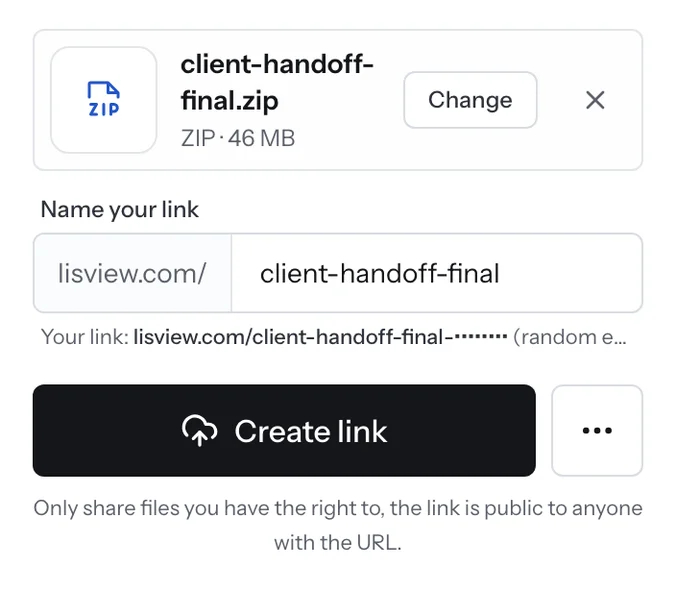
La zone d'import avec client-handoff-final.zip (ZIP, 46 Mo) sélectionné et le nom de lien lisview.com/client-handoff-final, prêt à créer
Choisissez le fichier et nommez le lien.
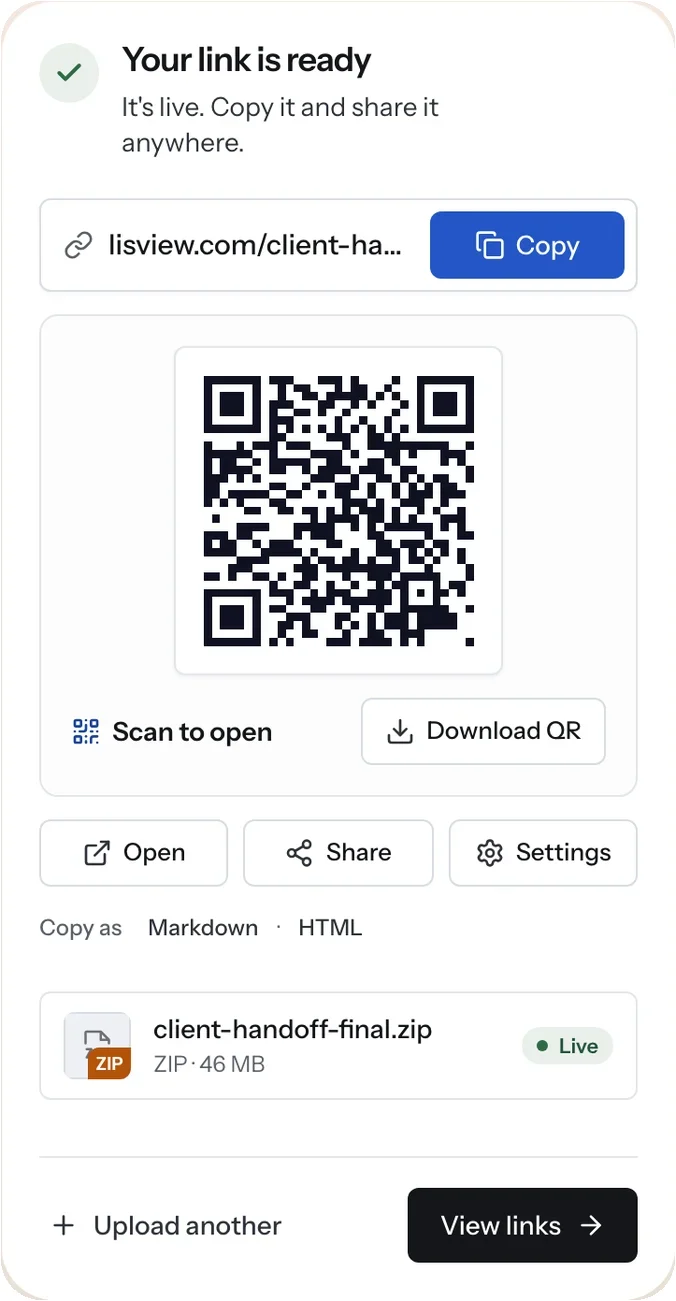
Votre lien est prêt : un lien lisview.com pour client-handoff-final.zip (46 Mo) avec un bouton Copier, un QR code et un badge Live
Copiez le lien ou son QR code.
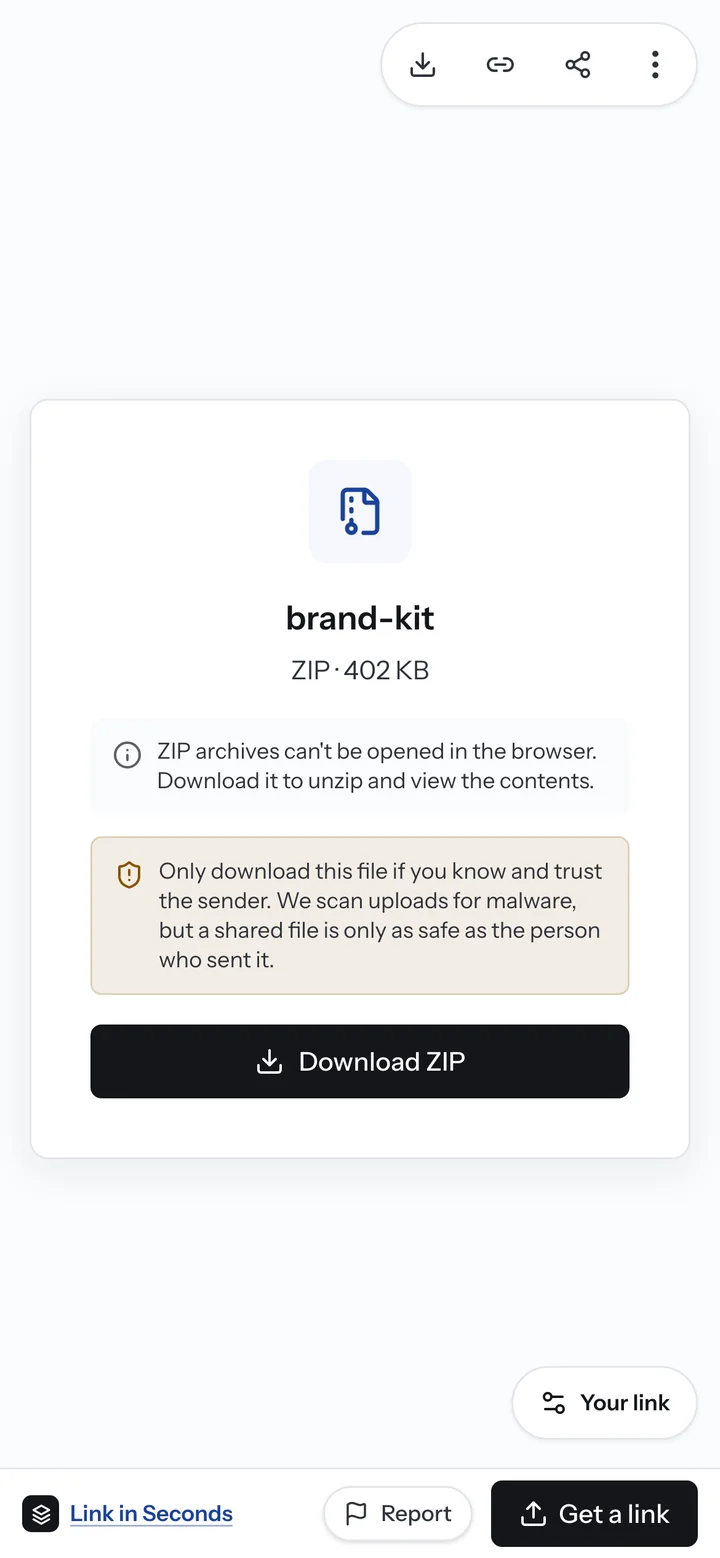
La page de téléchargement sur un téléphone : le nom de l'archive, sa taille et un bouton Télécharger le ZIP, sans connexion
On l'ouvre sur n'importe quel appareil, sans compte.

Why use a link instead of a SwissTransfer?

No 15-day countdown

SwissTransfer deletes files after 15 days unless you accept the extension email. A link here has no end date unless you add one, so a client can open it next month.

You see when it was opened

Each open shows up with the day, device and country. You can also get an email the first time someone opens the link.

Replace the file, keep the link

Upload a new version to the same link. People who saved the old link get the new file, so you never send a second transfer for a small fix.

Password, end date and view limit

Add a password, an end date or a view limit, or turn off downloads so people can only view the file. These work on every plan.

Link in Seconds, SwissTransfer and WeTransfer compared

Link in Seconds

Made for
Links that stay live
Largest send
10 Go per file
How long the link lasts
No end date unless you set one
Account needed to send
Oui
Video and PDF open in the browser
Oui
See when it was opened
Oui
Replace the file, same link
Oui
Price
From 3 $/mo after the 7-day trial

SwissTransfer

Made for
Big one-off transfers
Largest send
50 Go per transfer
How long the link lasts
15 days, up to 30 if extended
Account needed to send
Non
Video and PDF open in the browser
Download page
See when it was opened
Not listed
Replace the file, same link
Non
Price
Free

WeTransfer

Made for
Quick one-off transfers
Largest send
3 Go per 30 days (free)
How long the link lasts
Up to 3 days (free)
Account needed to send
See wetransfer.com
Video and PDF open in the browser
Preview, then download
See when it was opened
Downloaded or not
Replace the file, same link
Non
Price
Free plan; paid plans on wetransfer.com
SwissTransfer facts are from Infomaniak's support FAQ (updated September 2026), WeTransfer's from its help center, both checked November 2026. SwissTransfer is the better pick for sending tens of gigabytes once, with no account, from a Swiss company.

Demandez à ChatGPT, Perplexity ou Claude de comparer Link in Seconds avec SwissTransfer.

Which one should you use?

Link in Seconds

A file becomes one short link that stays live until you turn it off. Videos play, PDFs and Office files open as pages, and you see each open. You can replace the file later and the link stays the same.

It is not built for giant one-off transfers: one file can be up to 10 GB. You sign in to upload. From $3/mo after the 7-day trial.

Idéal pour : files people open more than once, like portfolios, proposals, course files and client deliveries.

Points forts

  • No expiry date unless you set one
  • Opens in the browser, no download needed
  • See when and where it was opened
  • Password, end date and view limit on every plan

Points faibles

  • 10 GB per file, not 50 GB
  • You need an account to upload
  • No free tier for big files

À savoir

  • Files are scanned for safety, so they are not end-to-end encrypted.
  • If your plan ends, links pause until you subscribe again; nothing is deleted.

SwissTransfer

SwissTransfer, run by Infomaniak in Switzerland, sends up to 50 GB in one transfer with no account at all. You can add a password and a download limit, and the person gets a plain download page.

Files are deleted after 15 days. Infomaniak emails you on day 12 with an offer to extend to 30 days, and the offer closes after 3 days. There is no way to update a file, and no view statistics are listed. It is free.

Idéal pour : one big send, like a raw video shoot or a project archive, that will be downloaded within two weeks.

Points forts

  • Up to 50 GB per transfer
  • No account for sender or receiver
  • Password and download cap
  • Free, hosted in Switzerland

Points faibles

  • Deleted after 15 days by default
  • Extension only by email, up to 30 days
  • People download the files to look at them

Read SwissTransfer's limits in full

WeTransfer

WeTransfer is the best-known transfer service. It is fast to use, works well for sending a batch of files once, and its paid plans add bigger transfers and longer storage.

The free plan allows 3 GB per rolling 30 days and keeps a transfer for up to 3 days, Paid plans are priced on wetransfer.com.

Idéal pour : quick, small, one-time sends to someone who will download the files today.

Points forts

  • Simple and widely known
  • Tells you if files were downloaded
  • Paid plans for big transfers

Points faibles

  • 3 GB per 30 days on free
  • Free transfers last up to 3 days
  • No same-link updates

Read the full comparison

Ce qu'en disent les gens

“L'interface d'administration est incroyablement intuitive et conçue exactement comme un utilisateur raisonne. Mes élèves ont tous trouvé que c'était facile à utiliser et que ça marchait parfaitement.”
JasonEnseignant, partage des supports de cours
“L'appli est vraiment agréable et simple à gérer. Je garde tous mes liens d'applis au même endroit, mes captures de l'App Store et du Play Store, et j'organise mes images et PDF en albums avec des tags. Avec ce grand stockage, tout tient ici.”
EvelynDéveloppeuse d'applications
“Je gère des contrats, des factures et des documents juridiques pour plusieurs organisations différentes, donc presque tout ce que j'envoie est protégé par mot de passe. Link in Seconds rend ça simple, et j'héberge mon portfolio sur un domaine personnalisé. C'est facile à utiliser et vraiment abordable.”
Guy HenryFreelance, contrats et factures

Toutes les fonctions de lien sur toutes les offres

Les offres diffèrent par la place : liens, stockage et taille de fichier, plus les pages HTML et l'hébergement de sites.

Pro mensuel

9 $/mois

facturé chaque mois, résiliable à tout moment

  • Liens illimités
  • 100 Go de stockage
  • 10 Go par fichier
  • Toutes les fonctions de lien incluses
  • Pages HTML et hébergement de sites
Voir le détail de l'offre

Lifetime

149 $99 $une fois

un seul paiement, sans renouvellement

  • Liens illimités
  • 200 Go de stockage
  • 10 Go par fichier
  • Toutes les fonctions de lien incluses
  • Pages HTML et hébergement de sites
Voir le détail de l'offre
Meilleur rapport qualité-prix

Pro annuel

4,08 $/mois

facturé 49 $ par an

  • 55 % de moins qu'en mensuel
  • Liens illimités
  • 100 Go de stockage
  • 10 Go par fichier
  • Toutes les fonctions de lien incluses
Voir le détail de l'offre

Essai gratuit de 7 jours, puis 9 $/mois + taxes. 0 $ aujourd'hui, résiliable à tout moment.Ou partagez des fichiers jusqu'à 5 Mo gratuitement, sans carte.

Comparer toutes les offres

Vous venez de WeTransfer, DocSend ou tiiny.host ? Voir les comparatifs

Questions about switching from SwissTransfer

For files that must stay online, a link that does not expire, like Link in Seconds. For one big send up to 50 Go with no account, SwissTransfer itself is hard to beat.

Les détails

What are the limits?

  • Files here are up to 10 Go each. Files up to 5 Mo are free with no card. Small takes files up to 3 Go (3 $/month) and Pro up to 10 Go (9 $/month), both after a 7-day free trial. SwissTransfer takes up to 50 Go in one transfer, so it wins for very big one-off sends.
  • Links have no expiry date unless you set one. If a plan ends and your files are over the free 5 Mo, links pause until you subscribe or delete files; nothing is deleted.
  • SwissTransfer needs no account at all. Here you sign in to upload, and the people you send to never need an account.

When should I keep using SwissTransfer?

Keep SwissTransfer for a single big transfer, from about 5 Go up to 50 Go, that the other person will download within two weeks. It needs no account and costs nothing. Use a link here when the file must stay available, when people should view it without downloading, or when you want to know it was opened.

  • Verdict: SwissTransfer for one big send, a link here for files that need to last.
  • Best for SwissTransfer: raw footage, archives and one-time handovers.
  • Best for a link here: portfolios, client files, course material and anything you update.

How long does a SwissTransfer link last?

15 days by default, according to Infomaniak's FAQ (September 2026). On day 12 the sender gets an email offering to extend it to up to 30 days, and that offer stays open for 3 days. After that the files are deleted and the link stops working.

SwissTransfer limits explained

Can I see if someone opened my link?

SwissTransfer lists no open or view statistics. A link here shows every open, with the day, device and country, and can email you when it is opened. Turn on the email option to ask for an email address before the file opens.

Is a link as safe as SwissTransfer?

Both encrypt files in transit and at rest, and both let you add a password. Links here aren't listed or indexed by search engines, and you can add an end date or a view limit and turn the link off at any time. Uploads are scanned for safety.

How we keep uploads safe

Who switches from SwissTransfer to a link?

  • Photographers. Deliver a shoot as one album link that is still there when the client comes back a month later.
  • Agencies. Send final videos and decks that clients watch in the browser, and see when they opened them.
  • Designers. Share source files as one ZIP link and replace it after each round of feedback.
  • Teachers. Post course files that students can open all term, not just for 15 days.

Tout ce qu'un lien peut faire

  • Nom personnalisé: Un lien dont on se souvient. Nommez le lien vous-même au lieu d'un code aléatoire. lisview.com/votre-nom est net dans un e-mail, sur une diapo ou sous un QR code. Les mots réservés sont bloqués, et le lien fonctionne toujours. Gardez le nom, changez le fichier derrière.
  • Protection par mot de passe: Réservez-le aux bonnes personnes. Ajoutez un mot de passe et le fichier reste scellé jusqu'à ce qu'on le saisisse. Le lien peut être transféré partout et ne s'ouvre que pour ceux qui l'ont. Haché, jamais stocké en clair. Appliqué au fichier lui-même, pas juste à la page.
  • Expiration et limite de vues: Des liens qui se ferment seuls. Fixez une date de fin ou un plafond de vues et le lien s'arrête seul. Envoyez un devis qui expire vendredi, ou un aperçu qui se ferme après cinq ouvertures. Par date, après N vues, ou les deux. Rouvrez-le à tout moment en retirant la limite.
  • QR code: Un code prêt à imprimer pour chaque lien. Chaque lien reçoit un QR code net, inclus dans chaque offre. Sur un menu, un flyer, une étiquette ou une boîte, il ouvre le même lien qu'un simple toucher. Téléchargez-le en SVG ou PNG, toute taille. Changez le fichier plus tard, le code imprimé marche toujours.
  • Suivi des vues: Sachez quand il s'ouvre. Voyez combien de personnes ont ouvert le lien et quand, avec tout le détail : sources, appareils, pays et ouvertures par QR code ou en direct. Inclus dans chaque offre. Un compteur en direct sur chaque lien, sans réglage. Un e-mail à la première ouverture.

Send a link that doesn't expire

Upload the file, copy the link and send it anywhere.

Free up to 5 Mo, no card. Bigger files: 7 days free, then from 3 $/mo. Cancel anytime. See plans

Cookies facultatifs d'analyse, de publicité et de relecture de session.