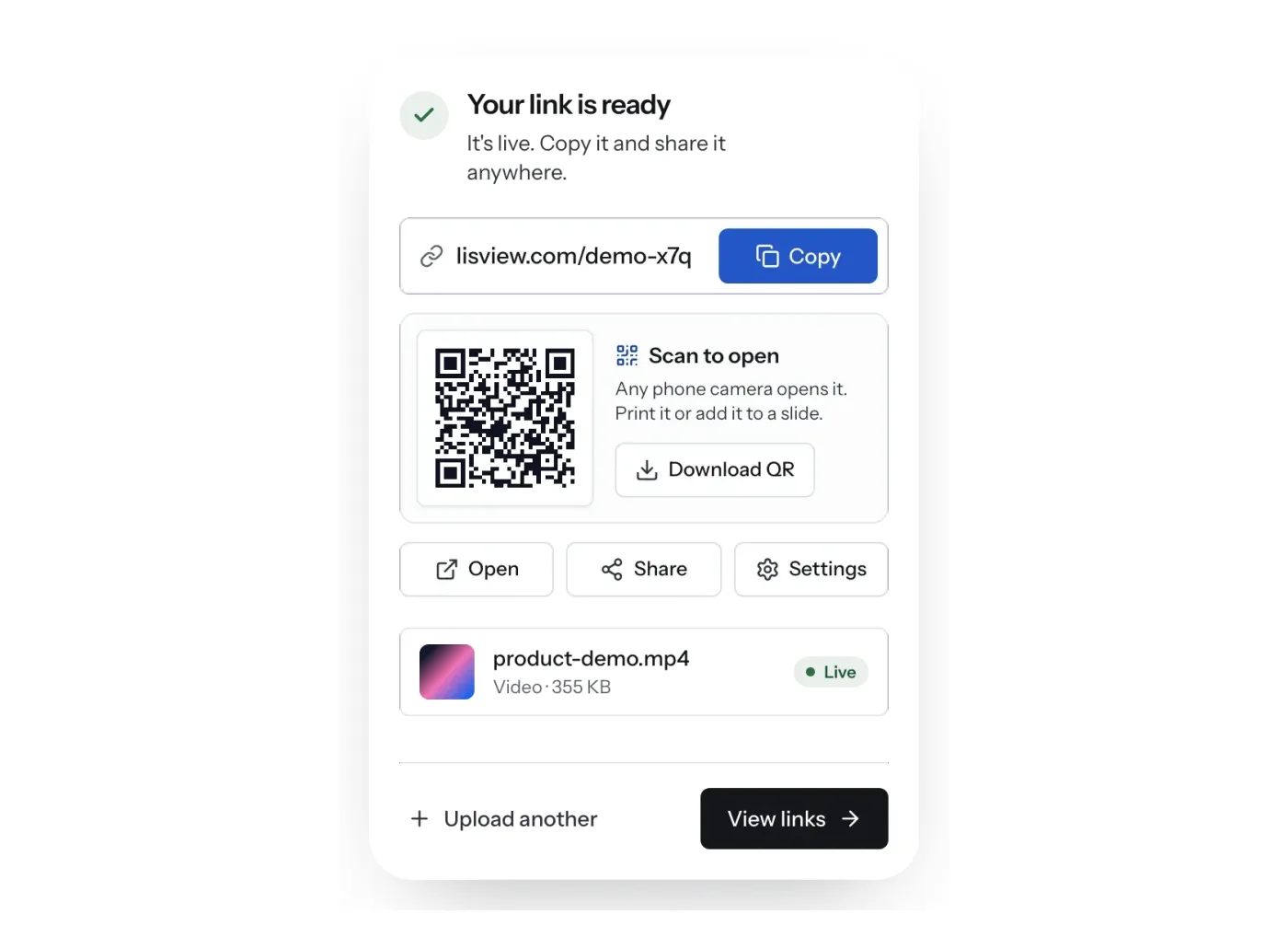
Upload the file, download the link's QR code and print it. The code keeps opening the file until you delete the link, and you can swap the file behind it without reprinting.
Lihat siapa yang membukanya, dan kapanKunci dengan kata sandiCetak atau bagikan sebagai kode QR
Lepas file kamu di sini
Lepas beberapa sekaligus, semuanya jadi satu link album
“Semua murid saya bilang mudah dipakai dan berjalan sempurna.”
Jason, Guru · membagikan materi kelas
Tanpa daftar untuk melihatJalan di browser, tidak perlu instal apa pun
GambarPDFVideoAudioSlideKodeSitus
Do QR codes expire?
A printed QR code never expires: the address is stored in the pattern itself. What stops working is the page or file it points to, or a dynamic QR service when its plan ends. Point the code at a link you control, like a Link in Seconds file link, and it opens until you delete the link.
The code points at a link you own
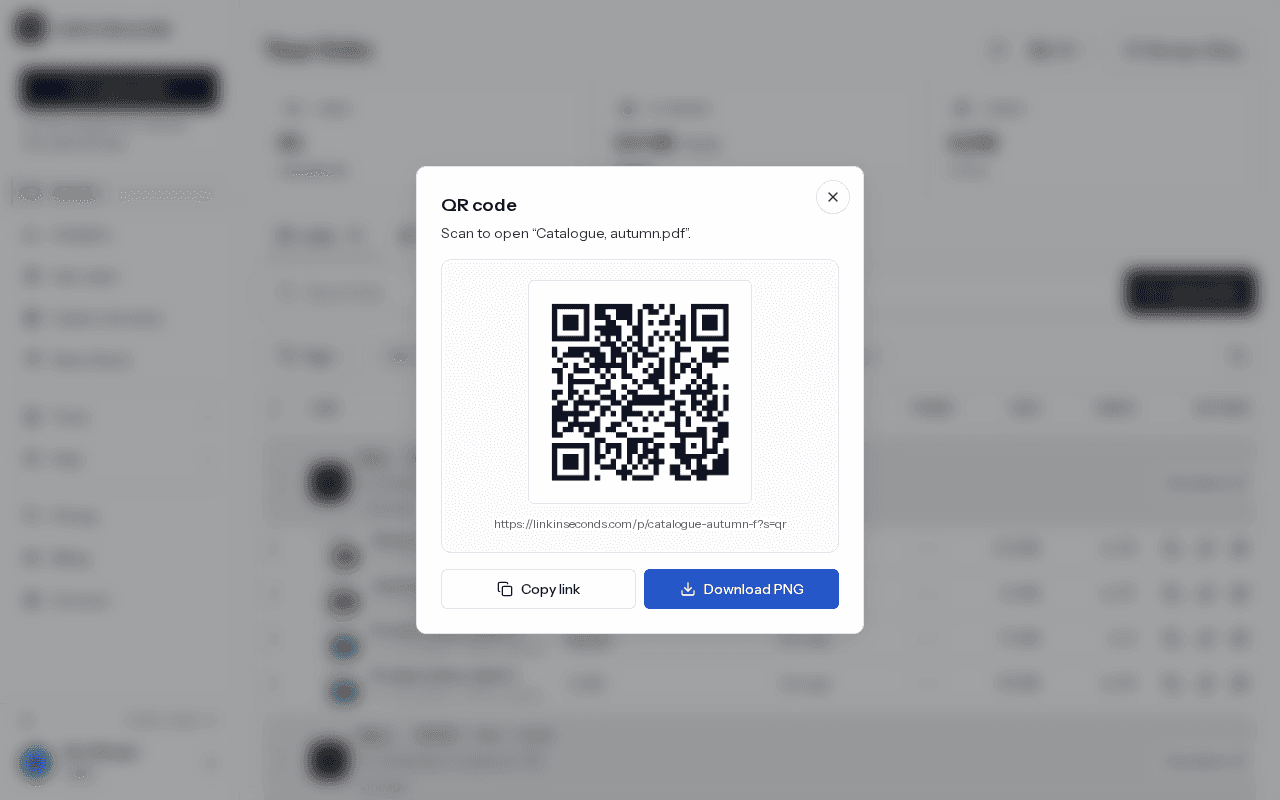
Every upload gets a link and a QR code for it (a PNG you download from the link). Nothing counts down on the link, so the code stays good until you delete it.
Swap the file, keep the print
New menu, corrected manual, updated video: replace the file in the link's settings and the same printed code opens the new version. Earlier versions are kept so you can restore them.
Scans counted apart from clicks
The address inside the QR ends in ?s=qr, so the link's analytics show scans separately from people who clicked the link. From 4 to 24 October 2026, 30% of video views on Link in Seconds came from a QR scan.
If you delete the link or switch it off. The code then opens a plain 'not available' page, never someone else's file.
If your plan ends and your files are over the free limit. Links pause, nothing is deleted, and they come back when you subscribe or delete files.
If you set an expiry date or a view limit on purpose, for a one-night event for example.
Which kind of QR code keeps working?
Geser tabel untuk melihat semua
Which kind of QR code keeps working?
Fitur
File link QR (Link in Seconds)
Static QR to a file URL
Dynamic QR service
Expires on its own
No, only if you set a date
No, but the file URL can break
Depends on the plan; check what happens when it ends
Change the file, same printed code
File link QR (Link in Seconds), Change the file, same printed code: ya
Static QR to a file URL, Change the file, same printed code: tidak
Dynamic QR service, Change the file, same printed code: ya
Counts scans
File link QR (Link in Seconds), Counts scans: ya
Static QR to a file URL, Counts scans: tidak
Usually, on paid plans
Opens the file in the phone browser
Yes: PDF pages, video playback
Depends where the file is hosted
Depends on the service
A static code stores the final address; a dynamic code stores the service's short address, which redirects for as long as the service keeps it on. Our column is from our own product as of 22 November 2026. A dynamic QR service is a fine choice when you already pay for one and need its design tools.
How to make a never-expiring QR code
1
Unggah file
Drop the video or PDF into the uploader and you get a link for it.
2
Download the QR code
Open the link's QR code and save the PNG. Scans are counted separately from clicks.
3
Print it, update the file later
Print the code. When the file changes, replace it on the same link and the printed code opens the new one.
What you get
Every upload comes with its QR code, ready to download.
From the dashboard: the same code for any link, as a PNG.
Every scan lands in the link's analytics, next to views and downloads.
Why do some QR codes stop working?
There are two reasons. A dynamic code stores a short address on the QR service's domain, which forwards to your file; when the service's trial or plan ends, the forwarding can stop. A static code stores the file's own address, so it breaks when that address changes: the file is moved, renamed, deleted, or its sharing setting goes back to private.
How to print a QR code for a video or PDF that lasts
Upload the video or PDF and give the link a readable name. Open the link's QR code and download the PNG; print it at least 2 cm wide with a white border so phone cameras read it. Test it with two phones before a print run. Paket Gratis mencakup file hingga 5 MB tanpa kartu, dan link gratis tidak pernah kedaluwarsa; uji coba gratis 7 hari (lalu $9/bulan, bisa dibatalkan kapan saja) dan Pro menerima file hingga 10 GB per file, dengan penyimpanan 100 GB.
Video or PDF: what the scanner sees
A PDF opens page by page in the phone browser, with nothing to download first. A video plays in the browser with seeking, which matters for MP4 files over a few megabytes. Neither needs an app or an account, and a password or view-only mode can sit in front of either.
Tambahkan kata sandi dan file tetap terkunci sampai seseorang mengetiknya. Link bisa diteruskan ke mana saja dan tetap hanya terbuka untuk orang yang tahu kata sandinya.
Atur tanggal berakhir atau batas tayangan, dan link berhenti dengan sendirinya. Kirim penawaran harga yang berakhir hari Jumat, atau pratinjau yang tertutup setelah lima kali dibuka, tanpa perlu ingat untuk menghapusnya.
Berdasarkan tanggal, setelah N tayangan, atau keduanya
Setiap link dapat kode QR yang tajam, termasuk di semua paket. Pasang di menu, brosur, label dinding, atau kemasan produk, dan kode itu membuka link yang sama seperti saat diketuk.
Unduh sebagai SVG atau PNG, ukuran apa pun
Ganti file nanti, kode yang sudah dicetak tetap berfungsi
Lihat berapa orang yang membuka link dan kapan, plus gambaran lengkapnya: sumber rujukan, perangkat, negara, dan dibuka lewat QR atau langsung. Termasuk di semua paket.
Hitungan langsung di setiap link, tanpa pengaturan
The box ships for years. Point the code at a setup video and update it when the product changes.
Restaurants and menus
Print the table card once. Swap the menu PDF each season and the same code opens it.
Signs, posters and listings
A property sign or event poster outlives most free QR trials. A file link has no trial to run out.
Kata mereka
Dengan kata-kata mereka
“Tampilan admin-nya sangat intuitif dan disusun persis seperti cara pengguna berpikir. Semua murid saya bilang mudah dipakai dan berjalan sempurna.”
JJasonGuru · membagikan materi kelas
“Aplikasinya benar-benar enak dan mudah dipakai. Semua link aplikasi saya ada di satu tempat, termasuk screenshot App Store dan Play Store, dan gambar serta PDF saya atur ke album dengan tag. Penyimpanannya besar, jadi semuanya cukup disimpan di sini.”
EEvelynDeveloper aplikasi
“Saya mengurus kontrak, invoice dan dokumen hukum untuk beberapa organisasi, jadi hampir semua yang saya kirim dilindungi kata sandi. Link in Seconds membuatnya simpel, dan portofolio saya jalan di domain sendiri. Mudah dipakai dan harganya benar-benar terjangkau.”
GGuy HenryFreelancer · kontrak dan invoice
Gratis hingga 5 MB, tanpa kartu. Coba semuanya gratis selama 7 hari; Pro menambah ruang, halaman HTML, dan hosting website.
The printed code never expires, because the address is stored in its pattern. It stops working when the page or file behind that address goes away, or when a dynamic QR service stops forwarding after its plan ends.
No. Links have no countdown, so the code keeps opening the file until you delete the link, switch it off or set an expiry date yourself. If a plan ends and your files are over the free limit, links pause until you subscribe or delete files; nothing is deleted.
The code holds a fixed link address, and you can replace the file behind that address at any time, which is what most people want from a dynamic code. It cannot be pointed at a different website later.
Yes. Replace the file in the link's settings and the same printed code opens the new version. Earlier versions are kept, so you can restore one.
5 MB gratis (tanpa kartu), 10 GB per file selama uji coba gratis
Yes, on every plan. The address in the code carries a scan marker, so the link's analytics show QR scans apart from direct clicks, with device and country.
Print a code once, keep it working
Upload the video or PDF, download its QR code, and swap the file later without reprinting.