Bagikan file besar di Discord
Send files over 20 MB without Nitro by sharing a link.
Lepas file kamu di sini
Lepas beberapa sekaligus, semuanya jadi satu link album
atau tempel gambar Ctrl+V
Gratis Free up to 5 MB, no card. Bigger files: 7 hari, lalu mulai $3/bulan. Bisa dibatalkan kapan saja. Lihat paket
“Semua murid saya bilang mudah dipakai dan berjalan sempurna.”
How do I share a large file on Discord?
Upload the file to a site that gives you a link, then paste the link into the channel or DM. Without Nitro, Discord only lets you attach files up to 20 MB. Nitro Basic raises that to 50 MB and Nitro to 1 GB. A link has no size limit on Discord, and Discord shows it as a preview.
- orang berbagi file
- 5.500+
- link dibagikan
- 11.300+
- kali dibuka
- 39.700+
Share a large file on Discord in 3 steps
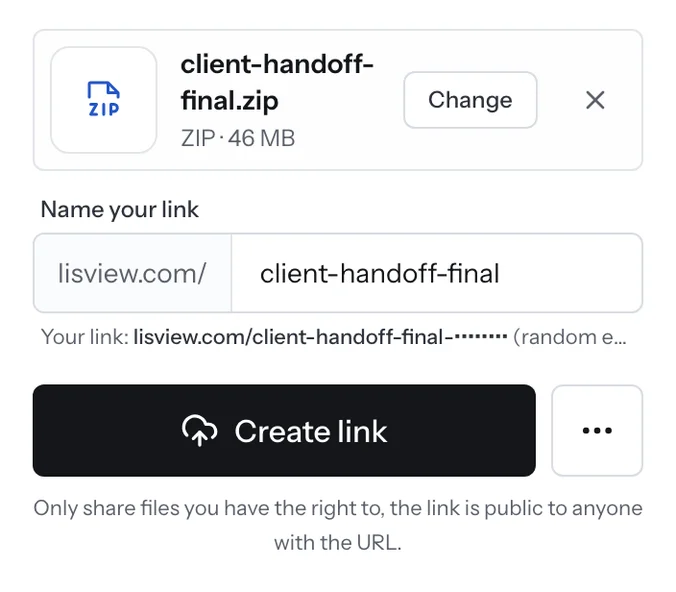
Unggah file
Drop the file into the box above, or pick several files to make one album link.
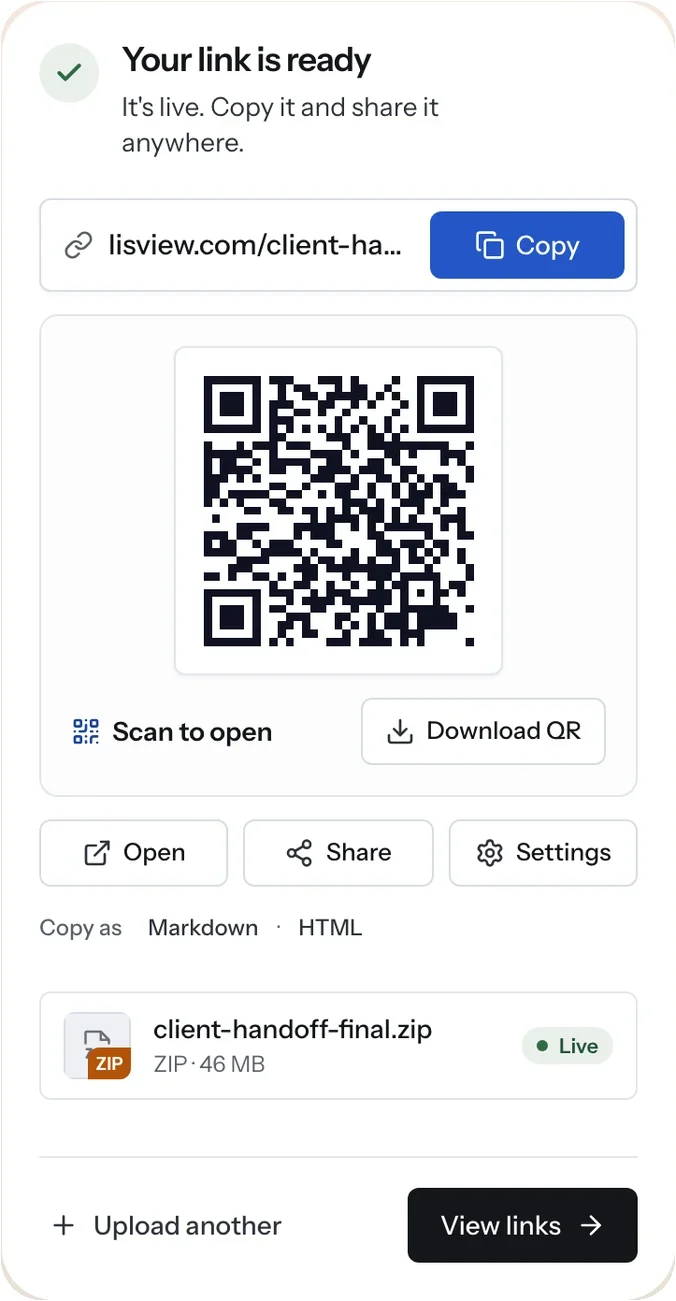
Salin link-nya
You get a short link and a QR code. Add a password if the server is public.
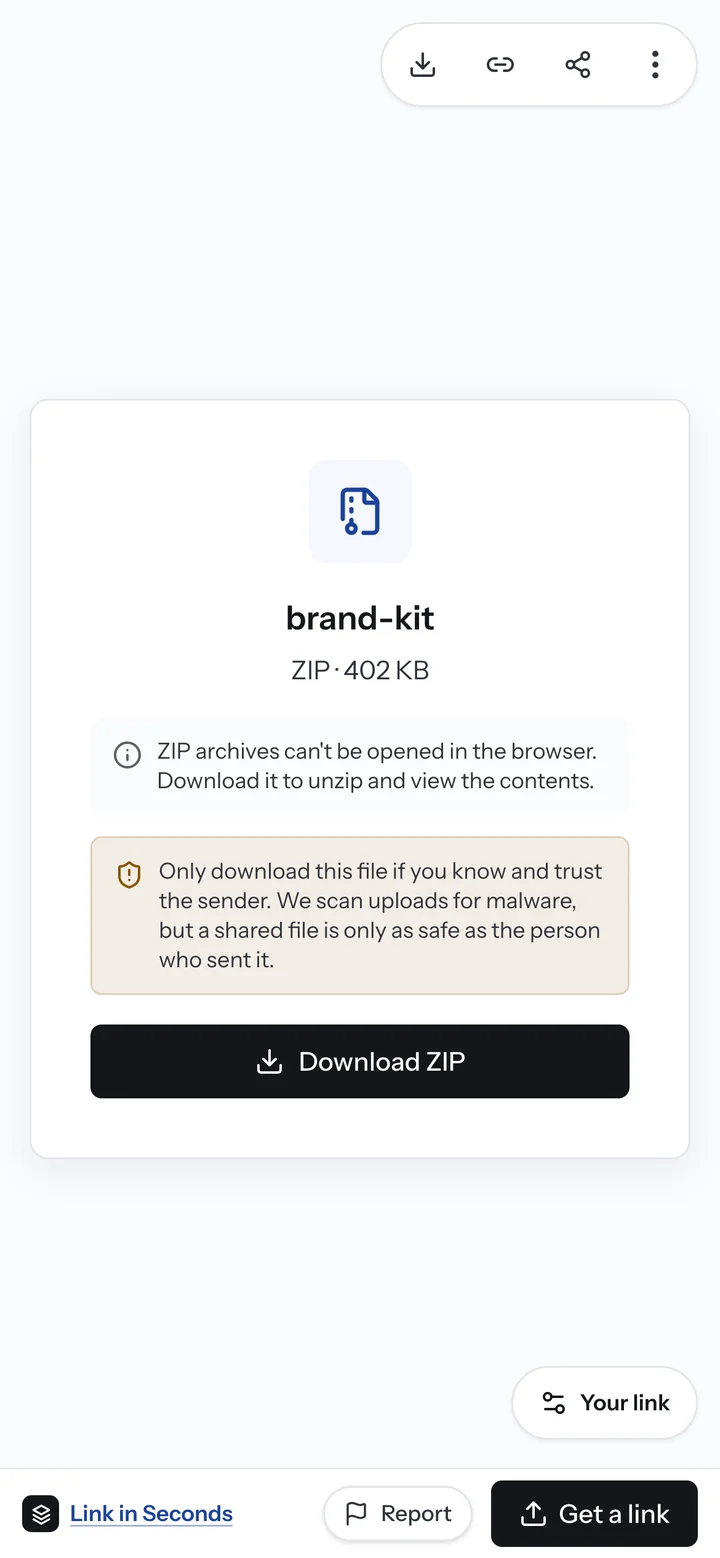
Paste it in Discord
Paste it into a channel or DM, and people open the file with one click.
Seperti apa tampilannya
Why share a link instead of attaching the file?
It works in every server and DM
A link is just text, so Discord's upload limit doesn't apply. It works the same in a small server, a big community or a private message.
The file keeps its full quality
You don't have to shrink a video to get it under 20 MB. Videos, music, images and PDFs stay exactly as you made them.
You decide who can open it
Add a password for a private group, set a date when the link stops working, or turn it off when you're done.
Update it without posting again
Upload a new version to the same link. The message you already posted in the channel now opens the latest file.
A link dibandingkan dengan Discord's upload limits
Link in Seconds link
- File terbesar
- 10 GB
- Harga
- Uji coba From $3/mo after the 7 hari
- Opens outside Discord
- Ya
- Password or end date
- Ya
- See how many times it was opened
- Ya
Discord (no Nitro)
- File terbesar
- 20 MB
- Harga
- Gratis
- Opens outside Discord
- Tidak
- Password or end date
- Tidak
- See how many times it was opened
- Tidak
Nitro Basic
- File terbesar
- 50 MB
- Harga
- $2.99/mo
- Opens outside Discord
- Tidak
- Password or end date
- Tidak
- See how many times it was opened
- Tidak
Nitro
- File terbesar
- 1 GB
- Harga
- $9.99/mo
- Opens outside Discord
- Tidak
- Password or end date
- Tidak
- See how many times it was opened
- Tidak
Kata mereka
“Tampilan admin-nya sangat intuitif dan disusun persis seperti cara pengguna berpikir. Semua murid saya bilang mudah dipakai dan berjalan sempurna.”
“Aplikasinya benar-benar enak dan mudah dipakai. Semua link aplikasi saya ada di satu tempat, termasuk screenshot App Store dan Play Store, dan gambar serta PDF saya atur ke album dengan tag. Penyimpanannya besar, jadi semuanya cukup disimpan di sini.”
“Saya mengurus kontrak, invoice dan dokumen hukum untuk beberapa organisasi, jadi hampir semua yang saya kirim dilindungi kata sandi. Link in Seconds membuatnya simpel, dan portofolio saya jalan di domain sendiri. Mudah dipakai dan harganya benar-benar terjangkau.”
Every link feature on every plan
Plans differ in room: links, storage and file size, plus HTML pages and website hosting.
Pro Monthly
$9/bulan
billed every month, cancel anytime
- Link tanpa batas
- Penyimpanan 100 GB of
- 10 GB per file
- Semua fitur link sudah termasuk
- Halaman HTML dan hosting website
Lifetime
$149$99sekali
sekali bayar, tanpa perpanjangan
- Link tanpa batas
- Penyimpanan 200 GB of
- 10 GB per file
- Semua fitur link sudah termasuk
- Halaman HTML dan hosting website
Pro Yearly
$4.08/bulan
billed $49 a year
- Hemat 55% dibanding bayar bulanan
- Link tanpa batas
- Penyimpanan 100 GB of
- 10 GB per file
- Semua fitur link sudah termasuk
Uji coba gratis 7 hari, lalu $9/bulan + pajak. $0 hari ini, batalkan kapan saja.Atau bagikan file hingga 5 MB gratis, tanpa kartu.
Pindahan dari WeTransfer, DocSend, atau tiiny.host? See the comparisons
Questions about sharing large files on Discord
The details
Apa saja batasnya?
- Discord without Nitro allows 20 MB per file. Nitro Basic allows 50 MB and Nitro allows 1 GB, in every server and DM.
- Here you can upload files up to 10 GB each. Files up to 5 MB are free with no card. Small takes files up to 3 GB ($3/month) and Pro up to 10 GB ($9/month), both after a 7-day free trial.
- Links have no expiry date unless you set one. If a plan ends and your files are over the free 5 MB, links pause until you subscribe or delete files; nothing is deleted.
Why does Discord say my file is too large?
Because the file is over your account's limit, which is 20 MB without Nitro. Since August 2026, Discord checks the size before it compresses anything, so a 25 MB phone video is refused. You can make the file smaller, pay for Nitro or share a link instead.
Every Discord limit, plan by planDoes boosting a server raise the limit?
Only inside that server. A Level 2 boost raises the limit to 50 MB and Level 3 to 100 MB for everyone in it, according to Discord's Server Boosting FAQ. In a DM or in another server, your own limit applies again.
Is Nitro worth it just for bigger uploads?
If you post large files most days, Nitro's 1 GB limit for $9.99 a month is fair, and you get its other perks too. If you only hit the 20 MB limit a few times a month, a link costs less and also works outside Discord.
- Verdict: Nitro if you post big files every day, a link if you only do it sometimes.
- Best for Nitro: streamers and creators who spend all day in Discord.
- Best for a link: mods, game builds, raw videos and files you also send outside Discord.
What does the link look like in the chat?
Discord turns it into a preview with the file's name and a small picture. When someone clicks it, the file opens on a web page: videos and music play, PDFs and images show, and other files get a download button. Links with a password show a plain preview.
How do I share a whole folder on Discord?
Zip the folder and upload the ZIP, or pick several files at once to make one album link. People open the album as a gallery in their browser, or download the ZIP in one click. Both work for mod packs, art packs and game builds.
Share a ZIP file as a linkWho shares files on Discord this way?
- Game modders. Post a mod pack or a game build as one ZIP link, and update it without posting a new message.
- Streamers and editors. Share full recordings and long clips with editors in full quality, well past 20 MB.
- Artists. Deliver high-resolution art and source files for commissions, with a password for the client.
- Study groups. Share lecture recordings and notes in a class server, so everyone opens the same version.
Semua yang bisa dilakukan sebuah link
- Nama link kustom: Link yang benar-benar mudah diingat. Beri nama link sendiri, bukan kode acak. lisview.com/nama-kamu terlihat rapi di email, di slide, atau di bawah kode QR. Kata yang dicadangkan diblokir, jadi link selalu berfungsi. Nama tetap, file di baliknya bisa diganti nanti.
- Lindungi dengan kata sandi: Kunci hanya untuk orang yang tepat. Tambahkan kata sandi dan file tetap terkunci sampai seseorang mengetiknya. Link bisa diteruskan ke mana saja dan tetap hanya terbuka untuk orang yang tahu kata sandinya. Di-hash, tidak pernah disimpan sebagai teks biasa. Berlaku pada file-nya, bukan hanya halamannya.
- Kedaluwarsa & batas tayangan: Link yang menutup sendiri. Atur tanggal berakhir atau batas tayangan, dan link berhenti dengan sendirinya. Kirim penawaran harga yang berakhir hari Jumat, atau pratinjau yang tertutup setelah lima kali dibuka, tanpa perlu ingat untuk menghapusnya. Berdasarkan tanggal, setelah N tayangan, atau keduanya. Buka lagi kapan saja dengan mematikan batasnya.
- kode QR: Kode siap cetak untuk setiap link. Setiap link dapat kode QR yang tajam, termasuk di semua paket. Pasang di menu, brosur, label dinding, atau kemasan produk, dan kode itu membuka link yang sama seperti saat diketuk. Unduh sebagai SVG atau PNG, ukuran apa pun. Ganti file nanti, kode yang sudah dicetak tetap berfungsi.
- Pelacakan tayangan: Tahu saat link dibuka. Lihat berapa orang yang membuka link dan kapan, plus gambaran lengkapnya: sumber rujukan, perangkat, negara, dan dibuka lewat QR atau langsung. Termasuk di semua paket. Hitungan langsung di setiap link, tanpa pengaturan. Dapat email saat link pertama kali dibuka.
Share your file on Discord as a link
Upload the file, copy the link and paste it into any channel.
Gratis Free up to 5 MB, no card. Bigger files: 7 hari, lalu mulai $3/bulan. Bisa dibatalkan kapan saja. Lihat paket